Get started with Q-CTRL Performance Management
See the API reference
Qiskit Functions are an experimental feature available only to IBM Quantum® Premium Plan, Flex Plan, and On-Prem (via IBM Quantum Platform API) Plan users. They are in preview release status and subject to change.
For an overview of this function, see the Q-CTRL Performance Management documentation home.
The code on this page was developed using the following requirements. We recommend using these versions or newer.
qiskit[all]~=2.3.1
qiskit-ibm-runtime~=0.45.1
Set up
Fire Opal Performance Management uses Qiskit v2.0.0, which is the recommended version. Supported versions are Qiskit >=v2.0.0.
Authenticate using your IBM Quantum Platform API key, and select the Qiskit Function as follows. (This snippet assumes you've already saved your account to your local environment.)
from qiskit_ibm_catalog import QiskitFunctionsCatalog

catalog = QiskitFunctionsCatalog(channel="ibm_quantum_platform")

# verify that you have access to the function
catalog.list()
Output:
[QiskitFunction(qunova/hivqe-chemistry),
 QiskitFunction(global-data-quantum/quantum-portfolio-optimizer),
 QiskitFunction(algorithmiq/tem),
 QiskitFunction(qedma/qesem),
 QiskitFunction(multiverse/singularity),
 QiskitFunction(ibm/circuit-function),
 QiskitFunction(q-ctrl/optimization-solver),
 QiskitFunction(colibritd/quick-pde),
 QiskitFunction(q-ctrl/performance-management),
 QiskitFunction(kipu-quantum/iskay-quantum-optimizer)]
# Access Function
perf_mgmt = catalog.load("q-ctrl/performance-management")If you want to use a backend that this function does not currently support, reach out to Q-CTRL to add support.
Estimator primitive
Estimator example
Use Fire Opal Performance Management's Estimator primitive to determine the expectation value of a single circuit-observable pair.
In addition to the qiskit-ibm-catalog and qiskit packages, you will also use the numpy package to run this example. You can install this package by uncommenting the following cell if you are running this example in a notebook using the IPython kernel.
# %pip install numpy1. Create the circuit
As an example, generate a random Hermitian operator and an observable to input to the Performance Management function.
import numpy as np
from qiskit.circuit.library import iqp
from qiskit.quantum_info import random_hermitian, SparsePauliOp

n_qubits = 50

# Generate a random circuit
mat = np.real(random_hermitian(n_qubits, seed=1234))
circuit = iqp(mat)
circuit.measure_all()

# Define observables as a string
observable = SparsePauliOp("Z" * n_qubits)
# Create PUB tuple
estimator_pubs = [(circuit, observable)]2. Run the circuit
Run the circuit and optionally define the backend and number of shots.
# Run the circuit using Estimator
qctrl_estimator_job = perf_mgmt.run(
    primitive="estimator",
    pubs=estimator_pubs,
    backend_name=backend_name,
)
You can use the familiar Qiskit Serverless APIs to check your Qiskit Function workload's status:
qctrl_estimator_job.status()Output:
'QUEUED'
3. Retrieve the result
# Retrieve the counts from the result list
result = qctrl_estimator_job.result()
The results have the same format as an Estimator result:
import numpy

result_str = str(result)

with numpy.printoptions(threshold=200):
    print(
        f"The result of the submitted job had {len(result)} PUB "
        f"and has a value:\n {result[0]}\n"
    )

print("The associated PubResult of this job has the following DataBins:")
print(f"{result[0].data}\n")

print(f"And this DataBin has attributes: {result[0].data.keys()}")

print("The expectation values measured from this PUB are:")
print(f"{result[0].data.evs}")
Output:
The result of the submitted job had 1 PUB
The result of the submitted job had 1 PUB and has a value:
 PubResult(data=DataBin(evs=0.0195, stds=0.9998098569228051), metadata={'precision': None})

The associated PubResult of this job has the following DataBins:
DataBin(evs=0.0195, stds=0.9998098569228051)

And this DataBin has attributes: dict_keys(['evs', 'stds'])
The expectation values measured from this PUB are:
0.0195
Sampler primitive
Sampler example
Use Fire Opal Performance Management's Sampler primitive to run a Bernstein–Vazirani circuit. This algorithm, used to find a hidden string from the outputs of a black box function, is a common benchmarking algorithm because there is a single correct answer.
1. Create the circuit
Define the correct answer to the algorithm, the hidden bitstring, and the Bernstein–Vazirani circuit. You can adjust the width of the circuit by simply changing the circuit_width.
import qiskit

circuit_width = 35
hidden_bitstring = "1" * circuit_width

# Create circuit, reserving one qubit for BV oracle
bv_circuit = qiskit.QuantumCircuit(circuit_width + 1, circuit_width)
bv_circuit.x(circuit_width)
bv_circuit.h(range(circuit_width + 1))
for input_qubit, bit in enumerate(reversed(hidden_bitstring)):
    if bit == "1":
        bv_circuit.cx(input_qubit, circuit_width)
bv_circuit.barrier()
bv_circuit.h(range(circuit_width + 1))
bv_circuit.barrier()
for input_qubit in range(circuit_width):
    bv_circuit.measure(input_qubit, input_qubit)

# Create PUB tuple
sampler_pubs = [(bv_circuit,)]
2. Run the circuit
Run the circuit and optionally define the backend and number of shots.
# Run the circuit using Sampler
qctrl_sampler_job = perf_mgmt.run(
    primitive="sampler",
    pubs=sampler_pubs,
    backend_name=backend_name,
)
Check your Qiskit Function workload's status or return results as follows:
# Print the ID so you can use it later, if necessary
print(qctrl_sampler_job.job_id)

qctrl_sampler_job.status()
Output:
60fe2fa1-a860-43e4-8615-c6ac4180f93b
'QUEUED'
3. Retrieve the result
# Retrieve the job results
sampler_result = qctrl_sampler_job.result()
# Get results for the first (and only) PUB
pub_result = sampler_result[0]
counts = pub_result.data.c.get_counts()
print("Counts for the meas output register (limited to 30 results):")
for i, (bitstring, count) in enumerate(counts.items()):
if i >= 50:
print(f" ... ({len(counts) - 30} more items)")
break
print(f" {bitstring}: {count}")Output:
Counts for the meas output register (limited to 30 results):
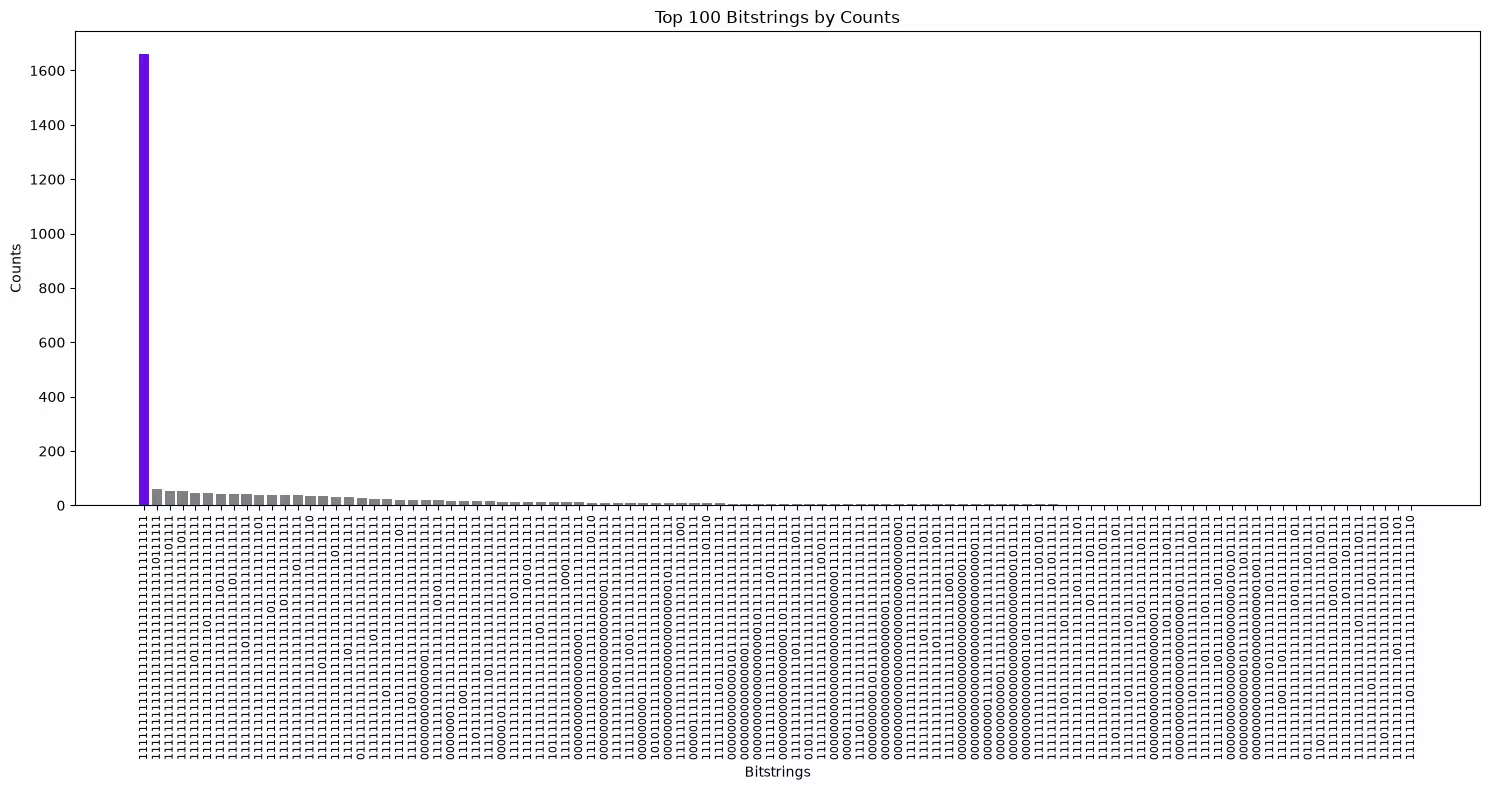
  11111111111111111111111111111111111: 1661
  11111111111111111111111111110111111: 60
  11111111111111111111111111111101111: 54
  11111111111111111111111111111110111: 54
  11111111111111011111111111111111111: 46
  11111111111111111110111111111111111: 44
  11111111111111111111111101111111111: 42
  11111111111111111111111110111111111: 42
  11111111111111110111111111111111111: 41
  11111111111111111111111111111111101: 39
  11111111111111111111101111111111111: 38
  11111111111111111111110111111111111: 38
  11111111111111111111111111101111111: 37
  11111111111111111111111111111111110: 36
  11111111111110111111111111111111111: 35
  11111111111111111111111111111011111: 32
  11111111111111101111111111111111111: 32
  01111111111111111111111111111111111: 27
  11111111111111111011111111111111111: 23
  11111111101111111111111111111111111: 22
  11111111111111111111111111111111011: 21
  11111111011111111111111111111111111: 20
  00000000000000011111111111111111111: 18
  11111111111111111111110101111111111: 18
  00000001111111111111111111111111111: 17
  11111111001111111111111111111111111: 16
  11101111111111111111111111111111111: 16
  11111111111101111111111111111111111: 16
  00000101111111111111111111111111111: 13
  11111111111111111111111011111111111: 13
  11111111111111111111111110101111111: 13
  11111111111111111101111111111111111: 12
  10111111111111111111111111111111111: 12
  11111111111111111111111110001111111: 12
  00000000000000000011111111111111111: 11
  11111111111111111111111111111110110: 10
  00000000000000000000000001111111111: 10
  11111111111011111111111111111111111: 9
  11111111111111101011111111111111111: 9
  00000000011111111111111111111111111: 8
  10101111111111111111111111111111111: 8
  00000000000000000000000001011111111: 8
  11111111111111111111111111111111001: 8
  00000111111111111111111111111111111: 7
  11111111111111111111111111111101110: 7
  11111111110111111111111111111111111: 7
  00000000000001011111111111111111111: 6
  00000000000000001111111111111111111: 6
  00000000000000000001011111111111111: 6
  11111111111111111111111111011111111: 6
  ... (1050 more items)
3. Plot the top bitstrings
Plot the bitstring with the highest counts to see if the hidden bitstring was the mode.
import matplotlib.pyplot as plt


def plot_top_bitstrings(counts_dict, hidden_bitstring=None):
    # Sort and take the top 100 bitstrings
    top_100 = sorted(counts_dict.items(), key=lambda x: x[1], reverse=True)[
        :100
    ]
    if not top_100:
        print("No bitstrings found in the input dictionary.")
        return

    # Unzip the bitstrings and their counts
    bitstrings, counts = zip(*top_100)

    # Assign colors: purple if the bitstring matches hidden_bitstring,
    # otherwise gray
    colors = [
        "#680CE9" if bit == hidden_bitstring else "gray" for bit in bitstrings
    ]

    # Create the bar plot
    plt.figure(figsize=(15, 8))
    plt.bar(
        range(len(bitstrings)), counts, tick_label=bitstrings, color=colors
    )

    # Rotate the bitstrings for better readability
    plt.xticks(rotation=90, fontsize=8)
    plt.xlabel("Bitstrings")
    plt.ylabel("Counts")
    plt.title("Top 100 Bitstrings by Counts")

    # Show the plot
    plt.tight_layout()
    plt.show()
The hidden bitstring is highlighted in purple, and it should be the bitstring with the highest number of counts.
plot_top_bitstrings(counts, hidden_bitstring)Output: