Performance Management: A Qiskit Function by Q-CTRL Fire Opal
See the API reference
Qiskit Functions are an experimental feature available only to IBM Quantum® Premium Plan, Flex Plan, and On-Prem (via IBM Quantum Platform API) Plan users. They are in preview release status and subject to change.
Overview
Fire Opal Performance Management makes it simple for anyone to achieve meaningful results from quantum computers at scale without needing to be quantum hardware experts. When running circuits with Fire Opal Performance Management, AI-driven error suppression techniques are automatically applied, enabling the scaling of larger problems with more gates and qubits. This approach reduces the number of shots required to reach the correct answer, with no added overhead — resulting in significant savings in both compute time and cost.
Performance Management suppresses errors and increases the probability of getting the correct answer on noisy hardware. In other words, it increases the signal-to-noise ratio. The following image shows how increased accuracy enabled by Performance Management can reduce the need for additional shots in the case of a 10-qubit Quantum Fourier Transform algorithm. With only 30 shots, Q-CTRL reaches the 99% confidence threshold, whereas the default (QiskitRuntime Sampler, optimization_level=3 and resilience_level=1, ibm_sherbrooke) requires 170,000 shots. By getting the right answer faster, you save significant compute runtime.
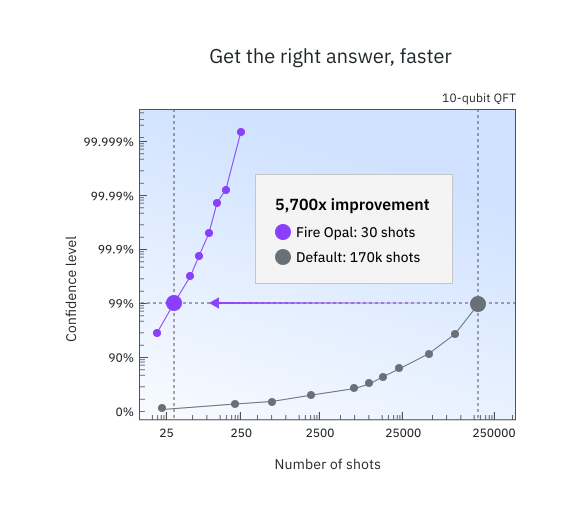
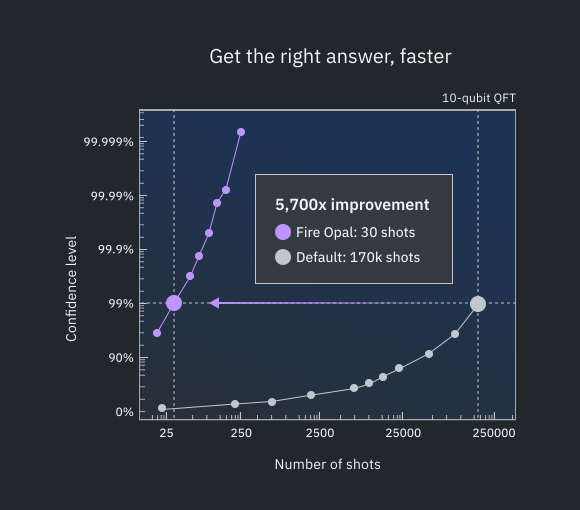
The Performance Management function can be used with any algorithm, and you can easily use it in place of the standard IBM Quantum primitives. Behind the scenes, multiple error suppression techniques work together to prevent errors from happening at runtime. All Fire Opal pipeline methods are pre-configured and algorithm-agnostic, meaning you always get the best performance out of the box.
To get access to Performance Management, contact Q-CTRL.
Description
Fire Opal Performance Management has two options for execution that are similar to the IBM Quantum primitives, so you can easily swap in the Q-CTRL Sampler and Estimator. The general workflow for using the Performance Management function is:
- Define your circuit (and operators in the case of the Estimator).
- Run the circuit.
- Retrieve the results.
To reduce hardware noise, Fire Opal employs a range of AI-driven error suppression techniques depicted in the following image. With Fire Opal, the entire pipeline is completely automated with zero need for configuration.
Fire Opal's pipeline eliminates the need for additional overhead, such as increased quantum runtime or extra physical qubits. Note that classical processing time remains a factor (refer to the Benchmarks section for estimates, where "Total time" reflects both classical and quantum processing). In contrast to error mitigation, which requires overhead in the form of sampling, Fire Opal's error suppression works at both the gate and pulse levels to address various sources of noise and to prevent the likelihood of an error occurring. By preventing errors, the need for expensive post-processing is eliminated.
The following image depicts the error suppression methods automated by Fire Opal Performance Management.
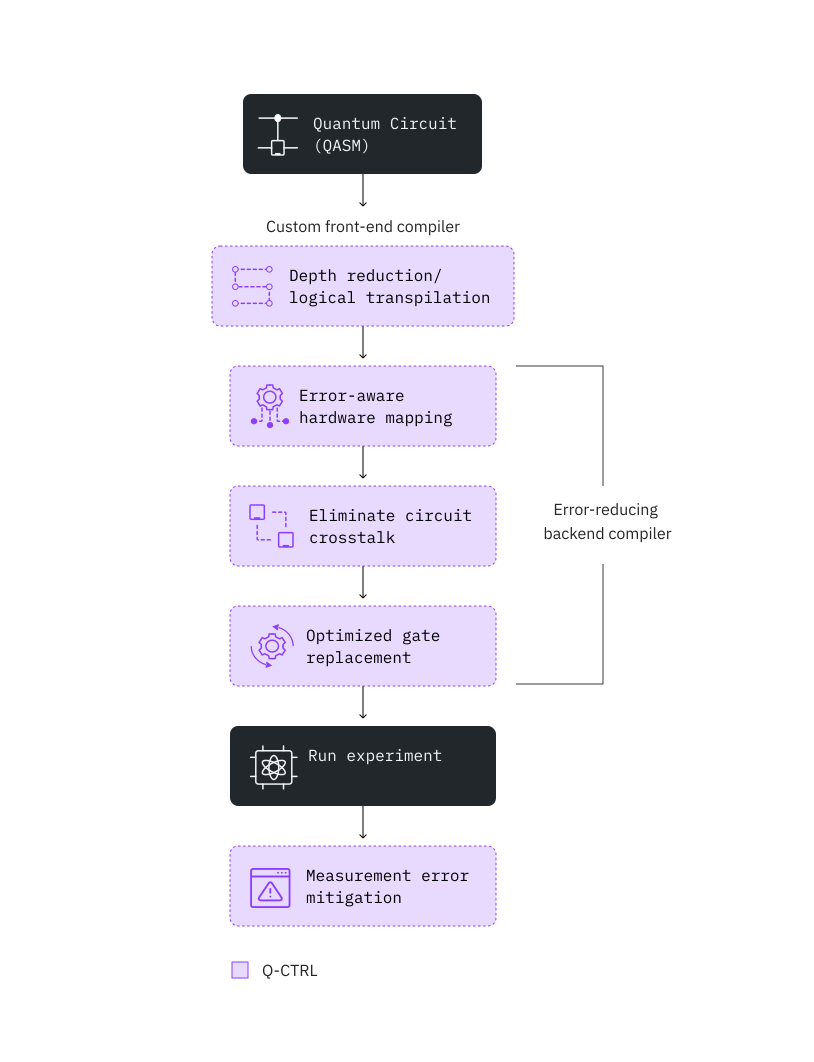
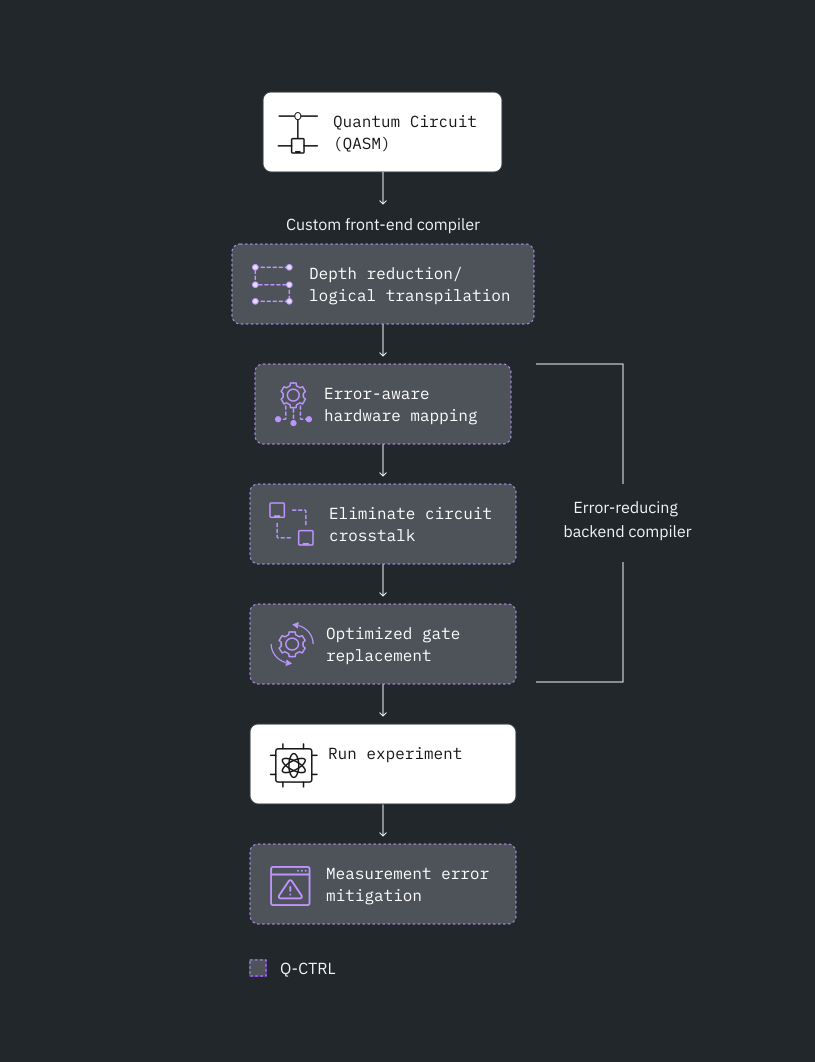
The function offers two primitives, Sampler and Estimator, and the inputs and outputs of both extend the implemented spec for IBM Quantum V2 primitives.
Benchmarks
Published algorithmic benchmarking results demonstrate significant performance improvement across various algorithms, including Bernstein-Vazirani, quantum Fourier transform, Grover’s search, quantum approximate optimization algorithm, and variational quantum eigensolver. The rest of this section provides more details about types of algorithms you can run, as well as the expected performance and runtimes.
The following independent studies demonstrate how Q-CTRL's Performance Management enables algorithmic research at record-breaking scale:
- Parametrized Energy-Efficient Quantum Kernels for Network Service Fault Diagnosis - up to 50-qubit quantum kernel learning
- Tensor-based quantum phase difference estimation for large-scale demonstration - up to 33-qubit quantum phase estimation
- Hierarchical Learning for Quantum ML: Novel Training Technique for Large-Scale Variational Quantum Circuits - up to 21-qubit quantum data loading
The following table provides a rough guide on accuracy and runtimes from prior benchmarking runs on ibm_fez. Performance on other devices may vary. The usage time is based on an assumption of 10,000 shots per circuit. The "Number of qubits" indicated is not a hard limitation but represents rough thresholds where you can expect extremely consistent solution accuracy. Larger problem sizes have been successfully solved, and testing beyond these limits is encouraged.
Example | Number of qubits | Accuracy | Measure of accuracy | Total time (s) | Runtime usage (s) | Primitive (Mode) |
|---|---|---|---|---|---|---|
| Bernstein–Vazirani | 50Q | 100% | Success Rate (Percentage of runs where the correct answer is the highest count bitstring) | 10 | 8 | Sampler |
| Quantum Fourier Transform | 30Q | 100% | Success Rate (Percentage of runs where the correct answer is the highest count bitstring) | 10 | 8 | Sampler |
| Quantum Phase Estimation | 30Q | 99.9998% | Accuracy of the angle found: 1- abs(real_angle - angle_found)/pi | 10 | 8 | Sampler |
| Quantum simulation: Ising model (15 steps) | 20Q | 99.775% | (defined below) | 60 (per step) | 15 (per step) | Estimator |
| Quantum simulation 2: molecular dynamics (20 time points) | 34Q | 96.78% | (defined below) | 10 (per time point) | 6 (per time point) | Estimator |
Defining the accuracy of the measurement of an expectation value - the metric is defined as follows:
where = ideal expectation value, = measured expectation value, = ideal maximum value, and = ideal minimum value. is simply the average of the value of across multiple measurements.
This metric is used because it is invariant to global shifts and scaling in the range of attainable values. In other words, regardless of whether you shift the range of possible expectation values higher or lower or increase the spread, the value of should remain consistent.
Get started
To learn how to load the function and run it, see Get started with Q-CTRL Performance Management.
Get support
For any questions or issues, contact Q-CTRL.
Next steps
- Request access to Q-CTRL Performance Management.
- Visit the API reference for this Qiskit Function.
- Try the Transverse-Field Ising Model with Q-CTRL's Performance Management tutorial.
- Try the Quantum Phase Estimation with Q-CTRL's Qiskit Functions tutorial
- Review Mundada P. S., et al. (2023). Experimental Benchmarking of an Automated Deterministic Error-Suppression Workflow for Quantum Algorithms. Physical Review Applied, 20, 2.
- Review Kanno, S., et al. (2025). Tensor-based quantum phase difference estimation for large-scale demonstration. arXiv preprint arXiv:2408.04946.
- Review SoftBank Corp, Demonstration Experiment of a Communication Service Fault Diagnosis System Using Quantum Machine Learning (blog), 30 August, 2024.
- Review Yamauchi, H., et al. (2024). Parametrized Energy-Efficient Quantum Kernels for Network Service Fault Diagnosis. arXiv preprint arXiv:2405.09724v1.
- Review Yamauchi, H., et al. (2025). Quantum spectroscopy of topological dynamics via a supersymmetric Hamiltonian. arXiv preprint arXiv:2511.23169v1.
- Review Wang, Y., et al. (2025). Δ-Motif: Subgraph Isomorphism at Scale via Data-Centric Parallelism. arXiv preprint arXiv:2508.21287.
- Review Paterakis, N. G., et al. (2025). Quantum Computing in the Computational Landscape of Power Electronics: Vision and Reality. arXiv preprint arXiv:2507.02577.
- Review Gharibyan, H., et al. (2023). Hierarchical Learning for Quantum ML: Novel Training Technique for Large-Scale Variational Quantum Circuits. arXiv preprint arXiv:2311.12929.
- Review the Mitsubishi Chemical Corp case study.
- Review the Redacted bank case study.
- Review the BlueQubit case study.