Get started with Q-CTRL Optimization Solver
See the API reference
Qiskit Functions are an experimental feature available only to IBM Quantum® Premium Plan, Flex Plan, and On-Prem (via IBM Quantum Platform API) Plan users. They are in preview release status and subject to change.
For an overview of this function, see the Q-CTRL Optimization Solver documentation home.
The code on this page was developed using the following requirements. We recommend using these versions or newer.
qiskit-ibm-runtime~=0.47.0
sympy~=1.14.0
Set up
First, authenticate using your IBM Quantum API key. Then, select the Qiskit Function as follows. (This snippet assumes you've already saved your account to your local environment.)
from qiskit_ibm_catalog import QiskitFunctionsCatalog

catalog = QiskitFunctionsCatalog(channel="ibm_quantum_platform")

# Verify that you have access to the function
catalog.list()
Output:
[QiskitFunction(qunova/hivqe-chemistry),
 QiskitFunction(global-data-quantum/quantum-portfolio-optimizer),
 QiskitFunction(algorithmiq/tem),
 QiskitFunction(qedma/qesem),
 QiskitFunction(multiverse/singularity),
 QiskitFunction(ibm/circuit-function),
 QiskitFunction(q-ctrl/optimization-solver),
 QiskitFunction(colibritd/quick-pde),
 QiskitFunction(q-ctrl/performance-management),
 QiskitFunction(kipu-quantum/iskay-quantum-optimizer)]
# Access Function
solver = catalog.load("q-ctrl/optimization-solver")
Example: Unconstrained optimization
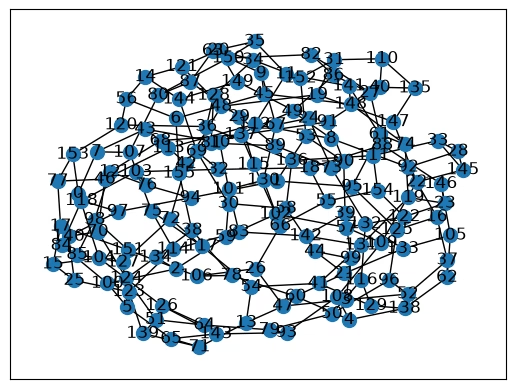
Run the maximum cut (max-cut) problem. The following example demonstrates the Solver's capabilities on a 156-node, 3-regular unweighted graph max-cut problem, but you can also solve weighted graph problems.
In addition to qiskit-ibm-catalog, you will also use the following packages to run this example: networkx and numpy. You can install these packages by uncommenting the following cell if you are running this example in a notebook using the IPython kernel.
# %pip install networkx numpy1. Define the problem
You can run a max-cut problem by defining a graph problem and specifying problem_type='maxcut'.
import networkx as nx
import numpy as np

# Generate a random graph with 156 nodes
maxcut_graph = nx.random_regular_graph(d=3, n=156, seed=8)
# Optionally, visualize the graph
nx.draw_networkx(
maxcut_graph, nx.kamada_kawai_layout(maxcut_graph), node_size=100
)Output:
The Solver accepts a string as the problem definition input.
# Convert graph to string
problem_as_str = nx.readwrite.json_graph.adjacency_data(maxcut_graph)
2. Run the problem
When using the graph-based input method, specify the problem type.
# Solve the problem
maxcut_job = solver.run(
    problem=problem_as_str,
    problem_type="maxcut",
    backend_name=backend_name,  # E.g. "ibm_fez"
)
Check your Qiskit Function workload's status or return results as follows:
# Print the ID so you can use it later, if necessary
print(maxcut_job.job_id)

# Get job status
print(maxcut_job.status())
Output:
34b53970-d95a-4e24-8763-fc6f3d112843
QUEUED
3. Retrieve the result
Retrieve the optimal cut value from the results dictionary.
The mapping of the variables to the bitstring may have changed. The output dictionary contains a variables_to_bitstring_index_map sub-dictionary, which helps to verify the ordering.
# Poll for results
maxcut_result = maxcut_job.result()

# Take the absolute value of the solution since the cost function is minimized
qctrl_maxcut = abs(maxcut_result["solution_bitstring_cost"])

# Print the optimal cut value found by the Optimization Solver
print(f"Optimal cut value: {qctrl_maxcut}")
Output:
Optimal cut value: 210.0
You can verify the accuracy of the result by solving the problem classically with open-source solvers like PuLP if the graph is not densely connected. High density problems may require advanced classical solvers to validate the solution.
Example: Constrained optimization
The prior max-cut example is a common quadratic unconstrained binary optimization problem. Q-CTRL's Optimization Solver can also solve constrained optimization problems by passing hard constraints directly to the Solver through the constraint input, instead of encoding them as penalty terms in the objective function. The Solver currently supports Hamming-weight-1 constraints: each constraint specifies a group of variables where exactly one variable must equal 1 and the rest must equal 0.
The following example demonstrates how to construct a cost function and a set of hard constraints for a constrained optimization problem, graph partitioning, by assigning every node in a graph to exactly one of several groups while minimizing the total weight of edges whose endpoints land in the same group.
In addition to the qiskit-ibm-catalog and qiskit packages, you will also use the following packages to run this example: numpy, networkx, and sympy. You can install these packages by uncommenting the following cell if you are running this example in a notebook using the IPython kernel.
# %pip install numpy networkx sympy1. Define the problem
Define a random graph partitioning problem by generating a graph with randomly weighted nodes.
import networkx as nx
from sympy import Symbol, Poly, srepr

# To change the weights, change the seed to any integer.
rng_seed = 18
_rng = np.random.default_rng(rng_seed)
node_count = 50
edge_probability = 0.08
graph = nx.erdos_renyi_graph(
    node_count, edge_probability, seed=rng_seed, directed=False
)

# add node weights
min_weight = -1.0
max_weight = 1.0
for i in graph.nodes:
    weight = (max_weight - min_weight) * _rng.random() + min_weight
    graph.add_node(i, weight=weight)

# Optionally, visualize the graph
nx.draw_networkx(graph, nx.kamada_kawai_layout(graph), node_size=200)
Output:
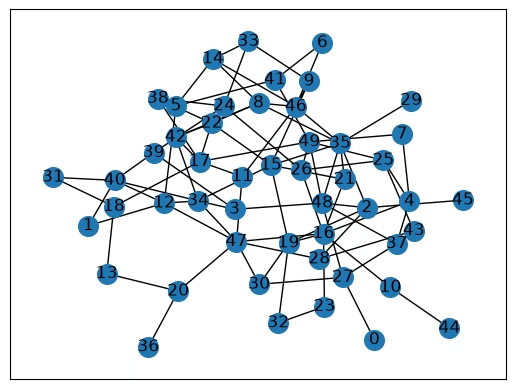
A standard optimization model for weighted graph partitioning can be formulated as follows. Split the nodes of the graph into three groups , and let if node is assigned to group , and otherwise. The goal is to minimize the total weight of edges whose endpoints are assigned to the same group, where the weight of an edge is the combined weight of its two endpoints, :
# Construct the cost function.
group_count = 3
variables = [
    Symbol(f"n[{i},{g}]")
    for i in range(node_count)
    for g in range(group_count)
]
node_group_var = {
    (i, g): variables[i * group_count + g]
    for i in range(node_count)
    for g in range(group_count)
}
cost_function = Poly(0, *variables)

for i, j in graph.edges():
    edge_weight = graph.nodes[i]["weight"] + graph.nodes[j]["weight"]
    for g in range(group_count):
        cost_function += (
            edge_weight * node_group_var[(i, g)] * node_group_var[(j, g)]
        )
Every node must be assigned to exactly one of the three groups. This is a Hamming-weight-1 constraint: for every node , exactly one of must equal 1, and the rest must equal 0:
Rather than encoding this requirement as a penalty term in the cost function, pass it directly to the Solver as a hard constraint using the constraint input.
# Build the hard constraint: exactly one group per node.
constraint_dict = {
    str(tuple(f"n[{i},{g}]" for g in range(group_count))): 1
    for i in range(node_count)
}
print(f"Problem constraints: {constraint_dict}")
Output:
Problem constraints: {"('n[0,0]', 'n[0,1]', 'n[0,2]')": 1, "('n[1,0]', 'n[1,1]', 'n[1,2]')": 1, "('n[2,0]', 'n[2,1]', 'n[2,2]')": 1, "('n[3,0]', 'n[3,1]', 'n[3,2]')": 1, "('n[4,0]', 'n[4,1]', 'n[4,2]')": 1, "('n[5,0]', 'n[5,1]', 'n[5,2]')": 1, "('n[6,0]', 'n[6,1]', 'n[6,2]')": 1, "('n[7,0]', 'n[7,1]', 'n[7,2]')": 1, "('n[8,0]', 'n[8,1]', 'n[8,2]')": 1, "('n[9,0]', 'n[9,1]', 'n[9,2]')": 1, "('n[10,0]', 'n[10,1]', 'n[10,2]')": 1, "('n[11,0]', 'n[11,1]', 'n[11,2]')": 1, "('n[12,0]', 'n[12,1]', 'n[12,2]')": 1, "('n[13,0]', 'n[13,1]', 'n[13,2]')": 1, "('n[14,0]', 'n[14,1]', 'n[14,2]')": 1, "('n[15,0]', 'n[15,1]', 'n[15,2]')": 1, "('n[16,0]', 'n[16,1]', 'n[16,2]')": 1, "('n[17,0]', 'n[17,1]', 'n[17,2]')": 1, "('n[18,0]', 'n[18,1]', 'n[18,2]')": 1, "('n[19,0]', 'n[19,1]', 'n[19,2]')": 1, "('n[20,0]', 'n[20,1]', 'n[20,2]')": 1, "('n[21,0]', 'n[21,1]', 'n[21,2]')": 1, "('n[22,0]', 'n[22,1]', 'n[22,2]')": 1, "('n[23,0]', 'n[23,1]', 'n[23,2]')": 1, "('n[24,0]', 'n[24,1]', 'n[24,2]')": 1, "('n[25,0]', 'n[25,1]', 'n[25,2]')": 1, "('n[26,0]', 'n[26,1]', 'n[26,2]')": 1, "('n[27,0]', 'n[27,1]', 'n[27,2]')": 1, "('n[28,0]', 'n[28,1]', 'n[28,2]')": 1, "('n[29,0]', 'n[29,1]', 'n[29,2]')": 1, "('n[30,0]', 'n[30,1]', 'n[30,2]')": 1, "('n[31,0]', 'n[31,1]', 'n[31,2]')": 1, "('n[32,0]', 'n[32,1]', 'n[32,2]')": 1, "('n[33,0]', 'n[33,1]', 'n[33,2]')": 1, "('n[34,0]', 'n[34,1]', 'n[34,2]')": 1, "('n[35,0]', 'n[35,1]', 'n[35,2]')": 1, "('n[36,0]', 'n[36,1]', 'n[36,2]')": 1, "('n[37,0]', 'n[37,1]', 'n[37,2]')": 1, "('n[38,0]', 'n[38,1]', 'n[38,2]')": 1, "('n[39,0]', 'n[39,1]', 'n[39,2]')": 1, "('n[40,0]', 'n[40,1]', 'n[40,2]')": 1, "('n[41,0]', 'n[41,1]', 'n[41,2]')": 1, "('n[42,0]', 'n[42,1]', 'n[42,2]')": 1, "('n[43,0]', 'n[43,1]', 'n[43,2]')": 1, "('n[44,0]', 'n[44,1]', 'n[44,2]')": 1, "('n[45,0]', 'n[45,1]', 'n[45,2]')": 1, "('n[46,0]', 'n[46,1]', 'n[46,2]')": 1, "('n[47,0]', 'n[47,1]', 'n[47,2]')": 1, "('n[48,0]', 'n[48,1]', 'n[48,2]')": 1, "('n[49,0]', 'n[49,1]', 'n[49,2]')": 1}
You do not need to add every variable to constraint. Any variable left out of the dictionary remains unconstrained, so you can mix hard-constrained groups of variables with free variables in the same problem.
2. Run the problem
# Solve the problem
partition_job = solver.run(
    problem=srepr(cost_function),
    constraint=constraint_dict,
    backend_name="ibm_marrakesh",  # E.g. "ibm_marrakesh"
)
Check your Qiskit Function workload's status or return results as follows:
# Print the ID so you can use it later, if necessary
print(partition_job.job_id)

# Get job status
print(partition_job.status())
Output:
b8085944-f313-444e-be39-ea61b1b47ebd
QUEUED
3. Get the result
Retrieve the solution and analyze the results. The solution cost represents the total weight of edges whose endpoints ended up in the same group, so a lower cost indicates a better partitioning of the graph.
partition_result = partition_job.result()
qctrl_cost = partition_result["solution_bitstring_cost"]
solution_bitstring = partition_result["solution_bitstring"]

# Print results
print(f"Total weight of same-group edges: {qctrl_cost}")
print(f"Solution bitstring: {solution_bitstring}")
Output:
Total weight of same-group edges: -36.5539
Solution bitstring: 100100100100100001100100100100100100100100100100100001010100010100100100100010001001100100100001100001100001010001001010100100100100100010100100100100