Get started with Quantum Portfolio Optimizer
See the API reference
Qiskit Functions are an experimental feature available only to IBM Quantum® Premium Plan, Flex Plan, and On-Prem (via IBM Quantum Platform API) Plan users. They are in preview release status and subject to change.
For an overview of this function, see the Quantum Portfolio Optimizer documentation home.
Set up
Authenticate using your API key and select the Qiskit Function as follows. (This snippet assumes you've already saved your account to your local environment.)
from qiskit_ibm_catalog import QiskitFunctionsCatalog

catalog = QiskitFunctionsCatalog(channel="ibm_quantum_platform")

# Verify that you have access to the function
catalog.list()
Output:
[QiskitFunction(qunova/hivqe-chemistry),
 QiskitFunction(global-data-quantum/quantum-portfolio-optimizer),
 QiskitFunction(algorithmiq/tem),
 QiskitFunction(qedma/qesem),
 QiskitFunction(multiverse/singularity),
 QiskitFunction(ibm/circuit-function),
 QiskitFunction(q-ctrl/optimization-solver),
 QiskitFunction(colibritd/quick-pde),
 QiskitFunction(q-ctrl/performance-management),
 QiskitFunction(kipu-quantum/iskay-quantum-optimizer)]
# Access function
dpo_solver = catalog.load("global-data-quantum/quantum-portfolio-optimizer")
Example: Dynamic portfolio optimization with seven assets
This example demonstrates how to execute the dynamic portfolio optimization (DPO) function and adjust its settings for optimal performance. It includes detailed steps for fine-tuning the parameters to achieve the desired outcomes.
This case involves seven assets, four time steps, and four resolution qubits, resulting in a total requirement of 112 qubits.
1. Read the assets included in the portfolio
If all the assets in the portfolio are stored in a folder at a specific path, you can load them into a pandas.DataFrame and convert it to a dict format object using the following function.
import os
import glob
import pandas as pd


def read_and_join_csv(file_pattern):
    """
    Reads multiple CSV files matching the file pattern and combines them
    into a single DataFrame.

    Parameters:
    file_pattern (str): The pattern to match CSV files.

    Returns:
    pd.DataFrame: Combined DataFrame with data from all CSV files.
    """
    # Find all files matching the pattern
    csv_files = glob.glob(file_pattern)
    # Get the base file names without the .csv extension
    file_names = [os.path.basename(f).replace(".csv", "") for f in csv_files]
    # Read each CSV file into a DataFrame and set the first column as the index
    df_list = [pd.read_csv(f).set_index("Unnamed: 0") for f in csv_files]

    # Rename columns in each DataFrame to the base file names
    for df, name in zip(df_list, file_names):
        df.columns = [name]

    # Combine all DataFrames into one by merging them side by side
    combined_df = pd.concat(df_list, axis=1)
    return combined_df


file_pattern = "route/to/folder/with/assets/data/*.csv"
assets = read_and_join_csv(file_pattern).to_dict()
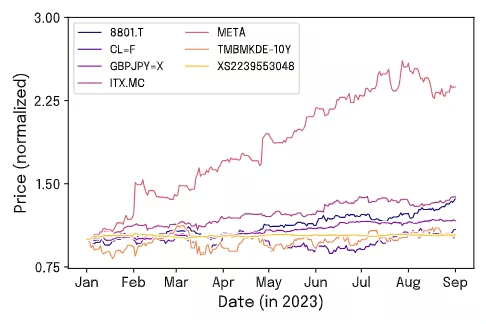
For this example, we have used the assets 8801.T, CLF, GBPJPY, ITX.MC, META, TMBMKDE-10Y, and XS2239553048. The following figure illustrates the data used in this example, showing the daily closing price evolution of the assets from 1 January to 1 September in 2023.
In this example, to ensure uniformity across dates, we have filled non-trading days with the closing price from the previous available date. We apply this step because the selected assets come from different markets with varying trading days, making it essential to standardize the dataset for consistency.
2. Define the problem
Define the specifications of the problem by configuring the parameters in the qubo_settings dictionary.
qubo_settings = {
    "nt": 4,
    "nq": 4,
    "dt": 30,
    "max_investment": 25,
    "risk_aversion": 1000.0,
    "transaction_fee": 0.01,
    "restriction_coeff": 1.0,
}
3. Define the optimizer and ansatz settings (Optional)
Optionally define specific requirements for the optimization process, including the selection of the optimizer and its parameters, as well as the specification of the primitive and its configurations.
For the Tailored Ansatz, the chosen population size was based on previous experiments showing that this value yields stable and efficient optimization.
In the case of the Real Amplitudes Ansatz, you can follow a linear relationship between the population_size and the number of qubits in the circuit. As an approximated rule of thumb, it is recommended to use a minimum population_size ~ 0.8 * n_qubits for the real_amplitudes ansatz.
It is expected that the Optimized Real Amplitudes will have a better optimization performance than the Real Amplitudes ansatz. However, the number of variables to optimize in this ansatz increases much faster than in the Real Amplitudes case (see the manuscript). Thus, for large problems, the Optimized Real Amplitudes requires more circuit executions. The Optimized Real Amplitudes is likely to be useful for problems requiring up to 100 qubits, but it is recommended to be mindful when setting the population_size parameters. As an example of this scale-up in population_size, the previous table shows that for an 84-qubit problem, the Optimize Real Amplitudes requires 120 population_size, while for a 56-qubit problem, a population_size of 40 is enough.
optimizer_settings = {
    "de_optimizer_settings": {
        "num_generations": 20,
        "population_size": 90,
        "recombination": 0.4,
        "max_parallel_jobs": 5,
        "max_batchsize": 4,
        "mutation_range": [0.0, 0.25],
    },
    "optimizer": "differential_evolution",
    "primitive_settings": {
        "estimator_shots": 25_000,
        "estimator_precision": None,
        "sampler_shots": 100_000,
    },
}
It is also possible to choose a specific ansatz. The following uses the 'Tailored' ansatz.
ansatz_settings = {
    "ansatz": "tailored",
    "multiple_passmanager": False,
}
4. Run the problem
dpo_job = dpo_solver.run(
    assets=assets,
    qubo_settings=qubo_settings,
    optimizer_settings=optimizer_settings,
    ansatz_settings=ansatz_settings,
    backend_name="<backend name>",
    previous_session_id=[],
    apply_postprocess=True,
)
5. Retrieve results
The function returns a dictionary with the investment trajectories ordered from lowest to highest according to their objective function value (see the Output section of the API reference). This set of results allows for the identification of the trajectory with the lowest cost and its corresponding investment evaluations. Additionally, it provides for the analysis of different trajectories, facilitating the selection of those that best align with specific needs or objectives. This flexibility ensures that choices can be tailored to suit a variety of preferences or scenarios.
Begin by presenting the resulting strategy that achieved the lowest objective cost found during the process.
# Get the results of the job
dpo_result = dpo_job.result()

# Show the solution strategy
dpo_result["result"]
Output:
{'time_step_0': {'8801.T': 0.11764705882352941,
  'ITX.MC': 0.20588235294117646,
  'META': 0.38235294117647056,
  'GBPJPY=X': 0.058823529411764705,
  'TMBMKDE-10Y': 0.0,
  'CLF': 0.058823529411764705,
  'XS2239553048': 0.17647058823529413},
 'time_step_1': {'8801.T': 0.11428571428571428,
  'ITX.MC': 0.14285714285714285,
  'META': 0.2,
  'GBPJPY=X': 0.02857142857142857,
  'TMBMKDE-10Y': 0.42857142857142855,
  'CLF': 0.0,
  'XS2239553048': 0.08571428571428572},
 'time_step_2': {'8801.T': 0.0,
  'ITX.MC': 0.09375,
  'META': 0.3125,
  'GBPJPY=X': 0.34375,
  'TMBMKDE-10Y': 0.0,
  'CLF': 0.0,
  'XS2239553048': 0.25},
 'time_step_3': {'8801.T': 0.3939393939393939,
  'ITX.MC': 0.09090909090909091,
  'META': 0.12121212121212122,
  'GBPJPY=X': 0.18181818181818182,
  'TMBMKDE-10Y': 0.0,
  'CLF': 0.0,
  'XS2239553048': 0.21212121212121213}}
Afterwards, using the metadata, you can access the results of all the sampled strategies. You can thereby further analyze the alternative trajectories returned by the optimizer. To do this, read the dictionary stored in dpo_result['metadata']['all_samples_metrics'], which contains not only additional information about the optimal strategy, but also details of the other candidate strategies evaluated during the optimization.
The following example shows how to read this information using pandas to extract key metrics associated with the optimal strategy. These include Restriction Deviation, Sharpe Ratio, and the corresponding investment return.
# Convert metadata to a DataFrame
df = pd.DataFrame(dpo_result["metadata"]["all_samples_metrics"])

# Find the minimum objective cost
min_cost = df["objective_costs"].min()
print(f"Minimum Objective Cost Found: {min_cost:.2f}")

# Extract the row with the lowest cost
best_row = df[df["objective_costs"] == min_cost].iloc[0]

# Display the results associated with the best solution
print("Best Solution:")
print(f"  - Restriction Deviation: {best_row['rest_breaches']}%")
print(f"  - Sharpe Ratio: {best_row['sharpe_ratios']:.2f}")
print(f"  - Return: {best_row['returns']}")
Output:
Minimum Objective Cost Found: -3.78
Best Solution:
  - Restriction Deviation: 40.0
  - Sharpe Ratio: 24.82
  - Return: 0.46
6. Performance analysis
Last, analyze the performance of your optimization application. Specifically, compare your results, obtained in the previous example, against a random baseline to assess the effectiveness of our approach. If the quantum algorithm demonstrably and consistently produces results with lower cost values, it indicates an effective optimization process.
The figure presents the probability distributions of the objective costs. To generate these distributions, take the list of objective costs from the function result and count the occurrences of each cost value (values rounded to the second decimal place). Then, update the count column accordingly by joining counts of identical rounded values. Note that, for better visual comparison, the occurrence counts have been normalized so that each distribution is displayed between 0 and 1.
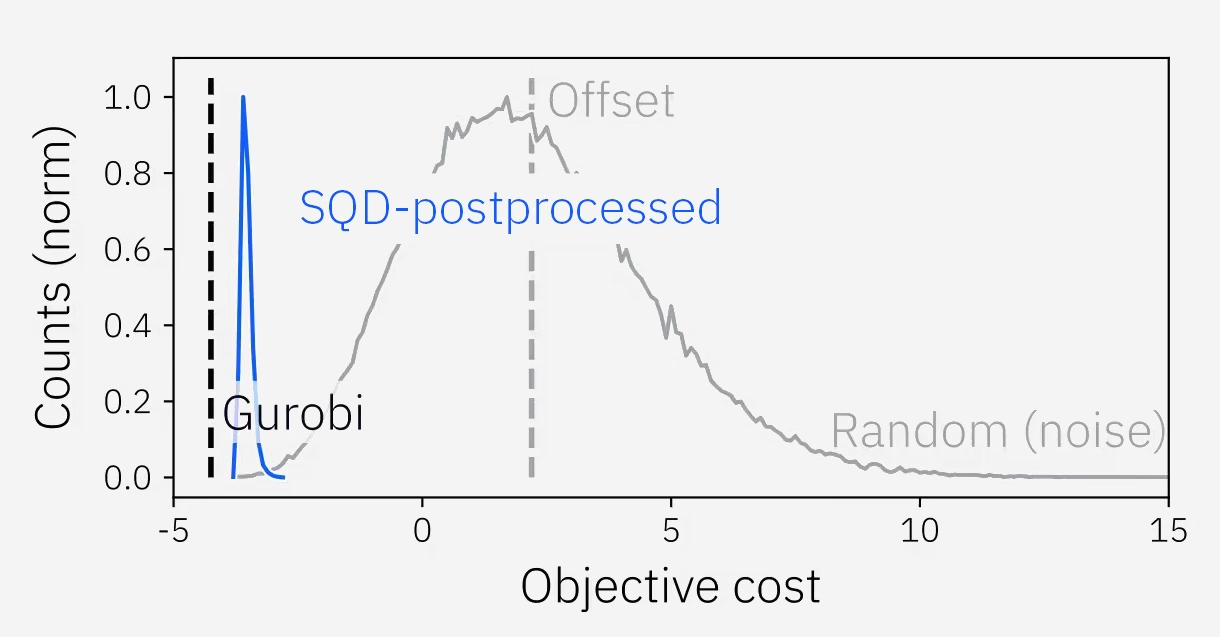
As shown in the figure (blue solid line), the cost distribution for our Variational Quantum Eigensolver (post-processed with SQD) approach is sharply concentrated at lower objective cost values, indicating good optimization performance. In contrast, the noisy baseline exhibits a broader distribution, centered around higher cost values. The gray dashed vertical line represents the mean value of the random distribution, further highlighting the consistency of the function in returning optimized investment strategies. For an additional comparison, the black dashed line in the figure corresponds to the solution obtained with the Gurobi optimizer (free version). All these results are further explored in the benchmarks below for the "Mixed Assets" example evaluated with the "Tailored" ansatz.