Get started with the Executor primitive
Package versions
The code on this page was developed using the following requirements. We recommend using these versions or newer.
qiskit[all]~=2.3.0
qiskit-ibm-runtime~=0.43.1
Similar to the Sampler primitive, Executor samples output registers from quantum circuit executions, but it does not have any built in error suppression or mitigation. Instead, it's part of the directed execution model that provides the ingredients to capture design intents on the client side, and shifts the costly generation of circuit variants to the server side. Executor follows the directives provided in circuit annotations and options, generates and binds parameter values, executes the bound circuits on the hardware, and returns the execution results and metadata. It does not make any implicit decisions for you and gives you full control and transparency.
The Qiskit package does not yet have a base class for the Executor primitive.
Before you begin
Some of the code examples on this page use samplex, which is part of the Samplomatic package. Therefore, before running those code block, you must install Samplomatic, as shown in the following code block. For more information, see the Samplomatic documentation.
pip install samplomatic

# For visualization support, include the visualization dependencies.
# pip install samplomatic[vis]
Steps to use the Executor primitive
1. Initialize the account
Because Qiskit Runtime is a managed service, you first need to initialize your account. You can then select the QPU you want to use to calculate the expectation value.
Follow the steps in the Set up your IBM Cloud® account if you don't already have an account.
from qiskit_ibm_runtime import QiskitRuntimeService, Executor
from qiskit_ibm_runtime.quantum_program import QuantumProgram
from qiskit.circuit import QuantumCircuit
from qiskit.transpiler import generate_preset_pass_manager
from samplomatic.transpiler import generate_boxing_pass_manager
from samplomatic import build

# Initialize the service and choose a backend
service = QiskitRuntimeService()
backend = service.least_busy(operational=True, simulator=False)print(backend)Output:
<IBMBackend('ibm_marrakesh')>
2. Create and transpile a circuit
You need at least one circuit to use the Executor primitive. It can optionally have parameters.
# Generate the circuit
circuit = QuantumCircuit(2)
circuit.h(0)
circuit.h(1)
circuit.cz(0, 1)
circuit.h(1)

# Using `measure_all` automatically creates the necessary
# classical registers.
circuit.measure_all()
The circuit needs to be transformed to only use instructions supported by the QPU (referred to as instruction set architecture (ISA) circuits). Use the transpiler to do this.
# Transpile the circuit
preset_pass_manager = generate_preset_pass_manager(
    backend=backend, optimization_level=0
)
isa_circuit = preset_pass_manager.run(circuit)
3. Initialize a QuantumProgram
Initialize a QuantumProgram with your workload. A QuantumProgram is made up of QuantumProgramItems. Typically, each item consists of a circuit, a set of parameter values, and possibly a samplex to randomize the circuit content. For full details, see Executor inputs and outputs.
The following cell initializes a QuantumProgram and specifies to perform 25 shots. Next, it appends the transpiled target circuit.
# Initialize an empty program
program = QuantumProgram(shots=25)

# Append the circuit to the program
program.append_circuit_item(isa_circuit)
4. Optional: Group gates and measurements into annotated boxes
Grouping instructions into boxes and annotating them is the primary way to specify your intent. In the following example, we use generate_boxing_pass_manager and its twirling parameters to group two-qubit gates and measurements into boxes and apply twirling annotation.
# Generate a boxing pass manager to group gates
# and measurements into boxes and add
# a`Twirl` annotation.
boxes_pm = generate_boxing_pass_manager(
    # Add gate twirling
    enable_gates=True,
    # Add measurement twirling
    enable_measures=True,
)

boxed_circuit = boxes_pm.run(isa_circuit)
boxed_circuit.draw("mpl", idle_wires=False)
Output:
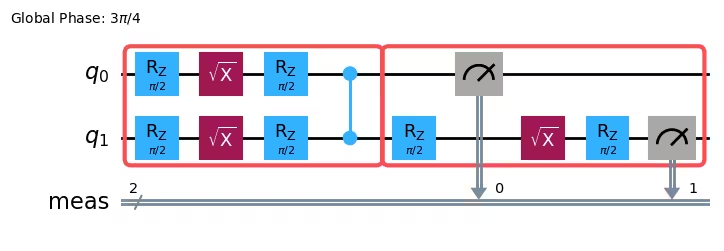
5. Optional: Build a template circuit and samplex, and add them to the program
Next, use the Samplomatic build method to generate the template circuit and samplex pair. The template circuit is structurally equivalent to the original circuit. However, its single-qubit gates are replaced by parameterized gates in order to implement the prescribed annotations (gate and measurement twirling, in this example). The samplex encodes all the information required to generate randomized parameters for the template circuit.
After generating the template circuit and samplex pair, use the append_samplex_item method to add the pair to the program.
See the Samplomatic API documentation for full details about samplomatic.samplex.Samplex and its arguments.
# Build the template circuit and the samplex
template_circuit, samplex = build(boxed_circuit)

# Append the template circuit and samplex as a `samplex_item`
program.append_samplex_item(
    template_circuit,
    samplex=samplex,
    shape=(num_randomizations := 20,),
)
6. Invoke Executor and get results
Run the QuantumProgram on an IBM® backend by using the Executor primitive with default options. See Executor options to learn about the available options.
# Initialize an Executor with the default options
executor = Executor(mode=backend)

# Submit the job
job = executor.run(program)
job
Output:
<RuntimeJobV2('d7ub80kinasc738sl6c0', 'executor')>
# Retrieve the result
result = job.result()
The result is of type QuantumProgramResult. See Executor input and output to learn about the result object.
Next steps
- Try some Executor examples.
- Understand Executor input and output.
- Learn about Executor broadcasting semantics.