Get started with Constrained Quantum Optimizer
See the API reference
Qiskit Functions are an experimental feature available only to IBM Quantum® Premium Plan, Flex Plan, and On-Prem (via IBM Quantum Platform API) Plan users. They are in preview release status and subject to change.
For an overview of this function, see the Constrained Quantum Optimizer documentation home.
Set up
This guide demonstrates basic usage of the Constrained Quantum Optimizer by showing how to load the function and execute simple problems. For a more involved tutorial, see Find the Maximum Independent Set with the Aqarios Constrained Quantum Optimizer.
Authenticate with your IBM Quantum API key and instance CRN, then load the function from the catalog.
The following code assumes you have saved your credentials. To set them up, follow the instructions in Save your IBM Cloud account credentials.
from qiskit_ibm_catalog import QiskitFunctionsCatalog

catalog = QiskitFunctionsCatalog(channel="ibm_quantum_platform")

# Verify that you have access to the function
catalog.list()
Output:
[QiskitFunction(aqarios/constrained-quantum-optimizer)]
# Load the function
optimizer = catalog.load("aqarios/constrained-quantum-optimizer")
# Check the list of backends you have access to
catalog.backends()Output:
[<IBMBackend('ibm_pittsburgh')>,
 <IBMBackend('ibm_boston')>,
 <IBMBackend('ibm_phoenix')>,
 <IBMBackend('ibm_fez')>,
 <IBMBackend('ibm_miami')>,
 <IBMBackend('ibm_marrakesh')>,
 <IBMBackend('ibm_kingston')>]
# Select the backend you want to use
backend = catalog.backend("ibm_phoenix")
Example 1: A simple constrained problem
The first example shows how to use the function with LP-files, a common optimization problem specification used in operations research. You will formulate the following arbitrary optimization problem of five binary variables subject to two constraints:
1. Formulate the problem
Directly state the mathematical expression as the following LP-string format:
lp_str = """\\Problem name: Example
Minimize
  obj: [ 2 x_1 x_2 + 4 x_2 x_3 - 2 x_3 x_4 - 4 x_4 x_5 - 4 x_1 x_3 - 8 x_2 x_5 ] / 2
Subject To
  c1: x_1 + x_2 + x_3 <= 1
  c2: x_3 - x_4 + x_5 = 0
Binaries
  x_1 x_2 x_3 x_4 x_5
End
"""
Note that [ ... ] / 2 is a required notation for quadratic objectives from the LP standard.
2. Run the optimizer
Solve the problem with the optimizer.
# Set up low-resource options for the simple problem
options = {"total_shots": 2000, "num_parallel": 5, "use_session": True}

# Dispatch the job
job_1 = optimizer.run(
    problem=lp_str, backend_name=backend.name, options=options
)

print(f"Job ID: {job_1.job_id}")
Output:
Job ID: 2e06a3a8-7c29-4c76-94d7-194293363f4a
# Monitor the job status
job_1.status()
Output:
'RUNNING: WAITING_FOR_QPU'
3. Retrieve the result
The solution, mapping the variable names to the associated assignments, is provided by the result.
result = job_1.result()

result
Output:
{'solutions': [{'x_1': 0, 'x_2': 1, 'x_3': 0, 'x_4': 1, 'x_5': 1}],
 'solution_bitstrings': ['01011'],
 'raw_energy': -6.0,
 'objective_value': -6.0,
 'feasible': True,
 'metadata': {'resource_usage': {'RUNNING: MAPPING': {'CPU': 5.405},
   'RUNNING: OPTIMIZING_FOR_HARDWARE': {'CPU': 9.902},
   'RUNNING: WAITING_FOR_QPU': {'CPU': 25.456},
   'RUNNING: EXECUTING_QPU': {'CPU': 25.202},
   'RUNNING: POST_PROCESSING': {'CPU': 6.481}},
  'circuit_metrics': {'before_transpilation': {'num_qubits': 6,
    'gate_count': 42,
    'depth': 15,
    'two_qubit_gate_count': 12,
    'two_qubit_gate_depth': 7,
    'operations': {'rz': 12,
     'p': 8,
     'ry': 7,
     'rzz': 4,
     'cx': 3,
     'xx_plus_yy': 3,
     'global_phase': 2,
     'cry': 2,
     'x': 1}},
   'after_transpilation': {'num_qubits': 6,
    'gate_count': 254,
    'depth': 100,
    'two_qubit_gate_count': 48,
    'two_qubit_gate_depth': 33,
    'operations': {'rz': 78, 'sx': 122, 'cz': 48, 'measure': 6, 'x': 0}}},
  'solver_info': {'variable_mapping': {'x_1': 0,
    'x_2': 1,
    'x_3': 2,
    'x_4': 3,
    'x_5': 4}}}}
The solutions field in the return dictionary contains all degenerate best solutions found, as dictionaries that map each variable name to its assignment. The same solutions are also returned as bitstrings in solution_bitstrings; metadata.solver_info.variable_mapping tells you which character position of a bitstring belongs to which variable. Alongside the solution data, the objective_value, a feasible flag, and additional metadata are provided.
Example 2: Maximum Independent Set
The Maximum Independent Set (MIS) problem asks for the largest subset of vertices in a graph such that no two vertices in the subset share an edge. This example solves MIS on a 12-node regular graph. For more information on the problem and a larger example, refer to the tutorial.
The problem is built with qiskit-addon-opt-mapper. Install the required packages if needed:
# %pip install networkx qiskit-addon-opt-mapperStep 1: Define the problem
Build a random 3-regular graph and create the MIS optimization problem. Each graph node becomes a binary variable, and each edge introduces a constraint ensuring that at most one endpoint is selected.
import networkx as nx
from qiskit_addon_opt_mapper.applications import IndependentSet
from qiskit_addon_opt_mapper.translators import to_docplex_mp

# 12-node random 3-regular graph
G = nx.random_regular_graph(3, 12, seed=7)

# Build MIS problem and export as LP string
mis = IndependentSet(G)
mis_problem = mis.to_optimization_problem()
lp_str = to_docplex_mp(mis_problem).export_as_lp_string()

print(lp_str)
Output:
\ This file has been generated by DOcplex
\ ENCODING=ISO-8859-1
\Problem name: Independent set

Maximize
 obj: x_0 + x_1 + x_2 + x_3 + x_4 + x_5 + x_6 + x_7 + x_8 + x_9 + x_10 + x_11
Subject To
 c0: x_0 + x_4 <= 1
 c1: x_0 + x_9 <= 1
 c2: x_0 + x_8 <= 1
 c3: x_1 + x_2 <= 1
 c4: x_1 + x_7 <= 1
 c5: x_1 + x_3 <= 1
 c6: x_2 + x_4 <= 1
 c7: x_2 + x_11 <= 1
 c8: x_3 + x_10 <= 1
 c9: x_3 + x_11 <= 1
 c10: x_4 + x_5 <= 1
 c11: x_5 + x_10 <= 1
 c12: x_5 + x_6 <= 1
 c13: x_6 + x_8 <= 1
 c14: x_6 + x_7 <= 1
 c15: x_7 + x_9 <= 1
 c16: x_8 + x_11 <= 1
 c17: x_9 + x_10 <= 1

Bounds
 0 <= x_0 <= 1
 0 <= x_1 <= 1
 0 <= x_2 <= 1
 0 <= x_3 <= 1
 0 <= x_4 <= 1
 0 <= x_5 <= 1
 0 <= x_6 <= 1
 0 <= x_7 <= 1
 0 <= x_8 <= 1
 0 <= x_9 <= 1
 0 <= x_10 <= 1
 0 <= x_11 <= 1

Binaries
 x_0 x_1 x_2 x_3 x_4 x_5 x_6 x_7 x_8 x_9 x_10 x_11
End
Step 2: Run the optimizer
Solve the problem with the optimizer.
options = {"total_shots": 2000, "use_session": True}

# Dispatch the job
job_2 = optimizer.run(
    problem=lp_str, backend_name=backend.name, options=options
)

print(f"Job ID: {job_2.job_id}")
Output:
Job ID: f041431c-b42e-4627-afe5-522fea61faf6
# Monitor the job status
job_2.status()
Output:
'QUEUED'
Step 3: Retrieve and interpret results
Finally we retrieve the solution and verify for correctness.
result = job_2.result()

print(f"Feasible: {result['feasible']}")
print(f"Independent set size: {int(result['objective_value'])}")

# Extract the selected nodes
solution = result["solutions"][0]
independent_set = [
    int(k.split("_")[1]) for k, v in solution.items() if v == 1
]
print(f"Selected nodes: {sorted(independent_set)}")

# Verify no two selected nodes share an edge
conflicts = [
    (u, v)
    for u, v in G.edges()
    if u in independent_set and v in independent_set
]
print(f"Edge conflicts: {conflicts}")
Output:
Feasible: True
Independent set size: 5
Selected nodes: [1, 4, 6, 9, 11]
Edge conflicts: []
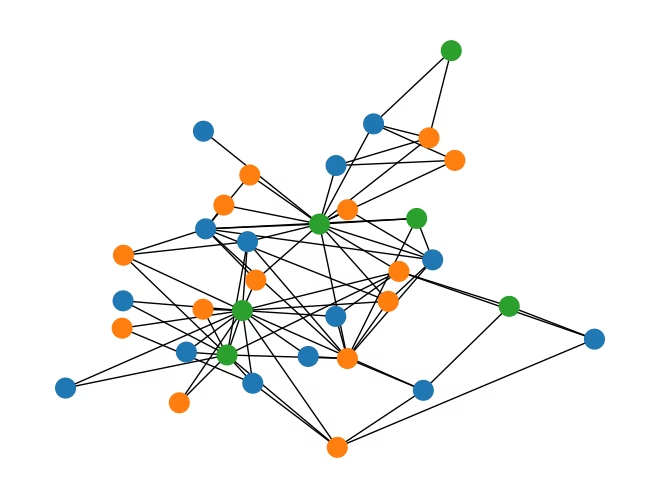
Example 3: Graph 3-coloring (Max-3-Cut)
The Max--Cut problem partitions the vertices of a graph into groups to maximize the number of edges whose endpoints belong to different groups. For this is equivalent to finding a 3-coloring that maximizes cross-color edges.
Formally, assign each node to one of groups with binary variables for color . The one-hot constraint for each node enforces a unique assignment. The objective maximizes cross-group edges:
The one-hot constraints are ideal for XY-mixers, which the optimizer handles natively.
This example uses the Zachary Karate Club graph (34 nodes, 78 edges) and builds the model with the Luna Model. Install the required packages if needed:
# %pip install networkx matplotlib luna-modelStep 1: Define the problem
First, generate the binary variables with the luna-model package. Then, define the objective and add the constraints to the model.
import networkx as nx
from luna_model import Model, quicksum

k = 3
G = nx.karate_club_graph()

# Instantiate the Model object
model = Model(name="Max-3-Cut")

# Add binary variables
x = model.add_variables("x", shape=(G.number_of_nodes(), k))

# Add the objective by using the numpy dot abstraction
model.objective = quicksum(x[i].dot(x[j]) for i, j in G.edges)

# Bulk-add the one-hot constraints
model.add_constraints(x.sum(axis=1) == 1)

# Encode the model to send via API
model_enc = model.encode_b64()
Step 2: Run the optimizer
Solve the problem with the optimizer.
options = {"use_session": True}

# Dispatch the job
job_3 = optimizer.run(
    problem=model_enc, backend_name=backend.name, options=options
)

print(f"Job ID: {job_3.job_id}")
Output:
Job ID: df911d83-9df7-44a1-bfad-5d66e08676c3
# Monitor the job status
job_3.status()
Output:
'RUNNING: WAITING_FOR_QPU'
Step 3: Retrieve and visualize results
Retrieve and visualize the results.
result = job_3.result()
solution = result["solutions"][0]

# Map each node to its assigned color group
node_group = {}
for i in G.nodes:
    for c in range(k):
        if solution[f"x{i},{c}"] == 1:
            node_group[i] = c

print(f"Feasible: {result['feasible']}")
print(f"Violations: {int(result['objective_value'])}")

# Visualize the partition
colors = ["tab:blue", "tab:orange", "tab:green"]
node_colors = [colors[node_group[i]] for i in G.nodes()]
nx.draw(G, nx.kamada_kawai_layout(G), node_color=node_colors, node_size=200)
Output:
Feasible: True
Violations: 4