IBM Circuit function
See the API reference
- Qiskit Functions are an experimental feature available only to IBM Quantum® Premium Plan, Flex Plan, and On-Prem (via IBM Quantum Platform API) Plan users. They are in preview release status and subject to change.
Overview
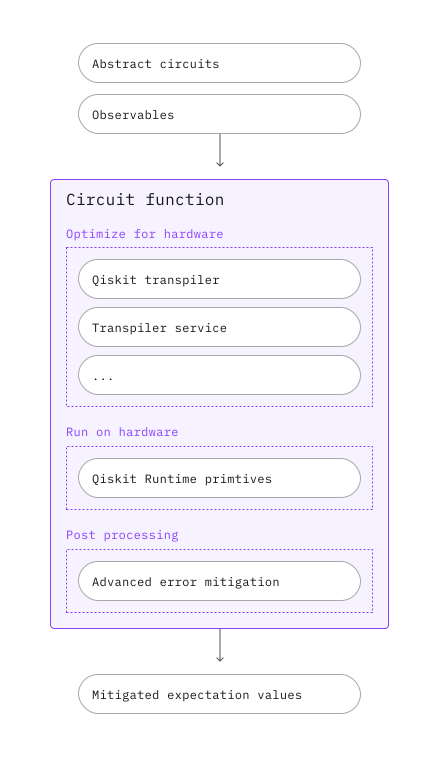
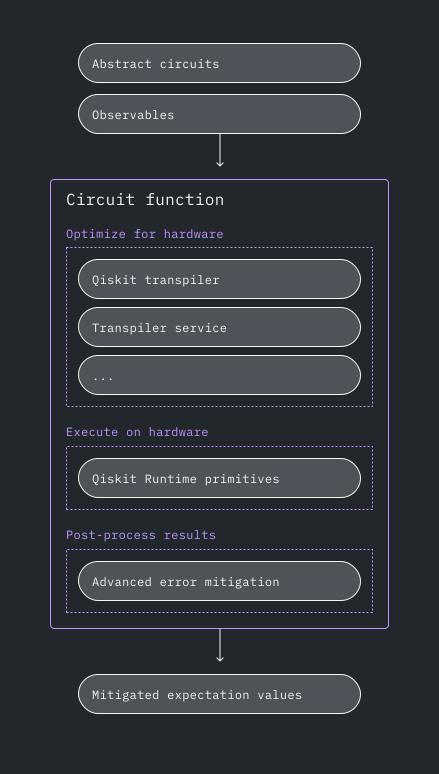
The IBM® Circuit function takes abstract PUBs as inputs, and returns mitigated expectation values as outputs. This circuit function includes an automated and customized pipeline to enable researchers to focus on algorithm and application discovery.
Description
After submitting your PUB, your abstract circuits and observables are automatically transpiled, executed on hardware, and post-processed to return mitigated expectation values. To do so, this combines the following tools:
- AI-powered transpiler, including auto-selection of AI-driven and heuristic transpilation passes to translate your abstract circuits to hardware-optimized ISA circuits
- Error suppression and mitigation required for utility-scale computation, including measurement and gate twirling, dynamical decoupling, Twirled Readout Error eXtinction (TREX), Zero-Noise Extrapolation (ZNE), and Probabilistic Error Amplification (PEA)
- Qiskit Runtime Estimator, to execute ISA PUBs on hardware and return mitigated expectation values
Get started
Authenticate using your API key and select the Qiskit Function as follows. (This snippet assumes you've already saved your account to your local environment.)
from qiskit_ibm_catalog import QiskitFunctionsCatalog

catalog = QiskitFunctionsCatalog(channel="ibm_quantum_platform")

function = catalog.load("ibm/circuit-function")
Examples
To get started, try this basic example:
from qiskit.circuit.random import random_circuit
from qiskit_ibm_runtime import QiskitRuntimeService

# You can skip this step if you have a target backend, e.g.
# backend_name = "ibm_brisbane"
# You'll need to specify the credentials when initializing QiskitRuntimeService, if they were not previously saved.
service = QiskitRuntimeService()
backend = service.least_busy(operational=True, simulator=False)

circuit = random_circuit(num_qubits=2, depth=2, seed=42)
observable = "Z" * circuit.num_qubits
pubs = [(circuit, observable)]

job = function.run(
    # Use `backend_name=backend_name` if you didn't initialize a backend object
    backend_name=backend.name,
    pubs=pubs,
)
Check your Qiskit Function workload's status or return results as follows:
print(job.status())
result = job.result()
Output:
QUEUED
The results have the same format as an Estimator result:
print(f"The result of the submitted job had {len(result)} PUB\n")
print(
    f"The associated PubResult of this job has the following DataBins:\n {result[0].data}\n"
)
print(f"And this DataBin has attributes: {result[0].data.keys()}")
print(
    f"The expectation values measured from this PUB are: \n{result[0].data.evs}"
)
Output:
The result of the submitted job had 1 PUB

The associated PubResult of this job has the following DataBins:
 DataBin(evs=np.ndarray(<shape=(), dtype=float64>), stds=np.ndarray(<shape=(), dtype=float64>), ensemble_standard_error=np.ndarray(<shape=(), dtype=float64>))

And this DataBin has attributes: dict_keys(['evs', 'stds', 'ensemble_standard_error'])
The expectation values measured from this PUB are:
1.02116704805492
Mitigation level examples
The following example demonstrates setting the mitigation level:
options = {"mitigation_level": 2}

job = function.run(backend_name=backend.name, pubs=pubs, options=options)
In the following example, setting the mitigation level to 1 initially turns off ZNE mitigation, but setting zne_mitigation to True overrides the relevant setup from mitigation_level.
options = {"mitigation_level": 1, "resilience": {"zne_mitigation": True}}Output example
The following code snippet describes the PrimitiveResult (and associated PubResult) format.
print(f"The result of the submitted job had {len(result)} PUB")
print(
    f"The expectation values measured from this PUB are: \n{result[0].data.evs}"
)
print(f"And the associated metadata is: \n{result[0].metadata}")
Output:
The result of the submitted job had 1 PUB
The expectation values measured from this PUB are:
1.02116704805492
And the associated metadata is:
{'shots': 4096, 'target_precision': 0.015625, 'circuit_metadata': {}, 'resilience': {}, 'num_randomizations': 32}
Fetch error messages
If your workload status is ERROR, use job.result() to fetch the error message to help debug as follows:
job = function.run(
    backend_name="bad_backend_name", pubs=pubs, options=options
)

print(job.result())
Output:
---------------------------------------------------------------------------
QiskitServerlessException                 Traceback (most recent call last)
Cell In[8], line 5
      1 job = function.run(
      2     backend_name="bad_backend_name", pubs=pubs, options=options
      3 )
----> 5 print(job.result())

File ~/work/documentation/documentation/.tox/py311/lib/python3.11/site-packages/qiskit_serverless/core/job.py:189, in Job.result(self, wait, cadence, verbose, maxwait)
    186 results = self._job_service.result(self.job_id)
    188 if self.status() == "ERROR":
--> 189     raise QiskitServerlessException(results)
    191 if isinstance(results, str):
    192     try:

QiskitServerlessException: "Traceback (most recent call last):\n  File \"/runner/runner.py\", line 10, in run\n    func = CircuitFunction(**arguments)\n           ^^^^^^^^^^^^^^^^^^^^^^^^^^^^\n  File \"/runner/circuit_function/circuit_function.py\", line 87, in __init__\n    self._backend = self._service.backend(\n                    ^^^^^^^^^^^^^^^^^^^^^^\n  File \"/usr/local/lib/python3.11/site-packages/qiskit_ibm_runtime/qiskit_runtime_service.py\", line 754, in backend\n    backends = self.backends(name, instance=instance, use_fractional_gates=use_fractional_gates)\n               ^^^^^^^^^^^^^^^^^^^^^^^^^^^^^^^^^^^^^^^^^^^^^^^^^^^^^^^^^^^^^^^^^^^^^^^^^^^^^^^^^\n  File \"/usr/local/lib/python3.11/site-packages/qiskit_ibm_runtime/qiskit_runtime_service.py\", line 497, in backends\n    raise QiskitBackendNotFoundError(\"No backend matches the criteria.\")\nqiskit.providers.exceptions.QiskitBackendNotFoundError: 'No backend matches the criteria.'\n"
Get support
Reach out to IBM Quantum support, and include the following information:
- Qiskit Function Job ID (
qiskit-ibm-catalog),job.job_id - A detailed description of the issue
- Any relevant error messages or codes
- Steps to reproduce the issue
Next steps
- Try the Error mitigation with the IBM Circuit function tutorial.
- Visit the API reference for this Qiskit Function.