QUICK-PDE: A Qiskit Function by ColibriTD
See the API reference
Qiskit Functions are an experimental feature available to IBM Quantum® Premium Plan, Flex Plan, and On-Prem (via IBM Quantum Platform API) Plan users. They are in preview release status and subject to change.
Overview
The Partial Differential Equation (PDE) solver presented here is part of our Quantum Innovative Computing Kit (QUICK) platform (QUICK-PDE), and is packaged as a Qiskit Function. With the QUICK-PDE function, you can solve domain-specific partial differential equations on IBM Quantum QPUs. This function is based on the algorithm described in ColibriTD's H-DES description paper. This algorithm can solve complex multi-physics problems, starting with Computational Fluid Dynamics (CFD) and Materials Deformation (MD), and other use cases coming soon.
To tackle the differential equations, the trial solutions are encoded as linear combinations of orthogonal functions (typically Chebyshev polynomials, and more specifically of them where is the number of qubits encoding your function), parametrized by the angles of a Variable Quantum Circuit (VQC). The ansatz generates a state encoding the function, which is evaluated by observables whose combinations allow for evaluating the function at all points. You can then evaluate the loss function in which the differential equations are encoded, and fine-tune the angles in a hybrid loop, as shown in the following. The trial solutions get gradually closer to the actual solutions until you reach a satisfactory result.
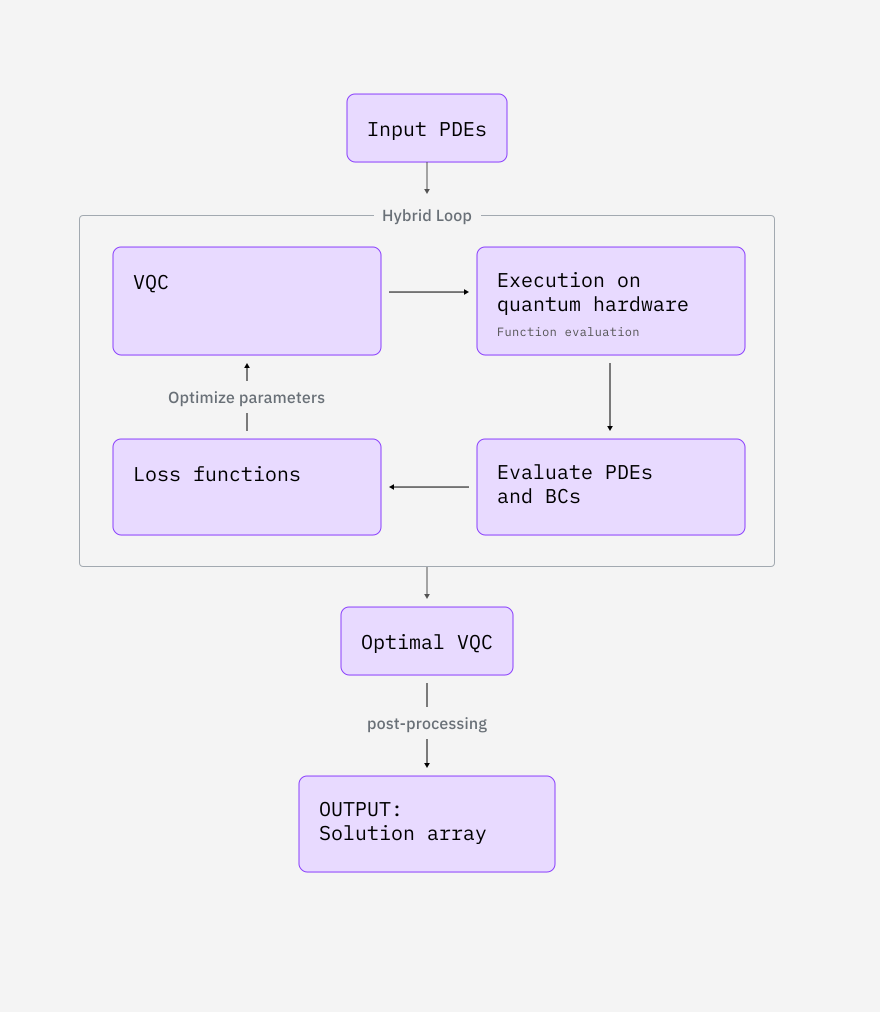
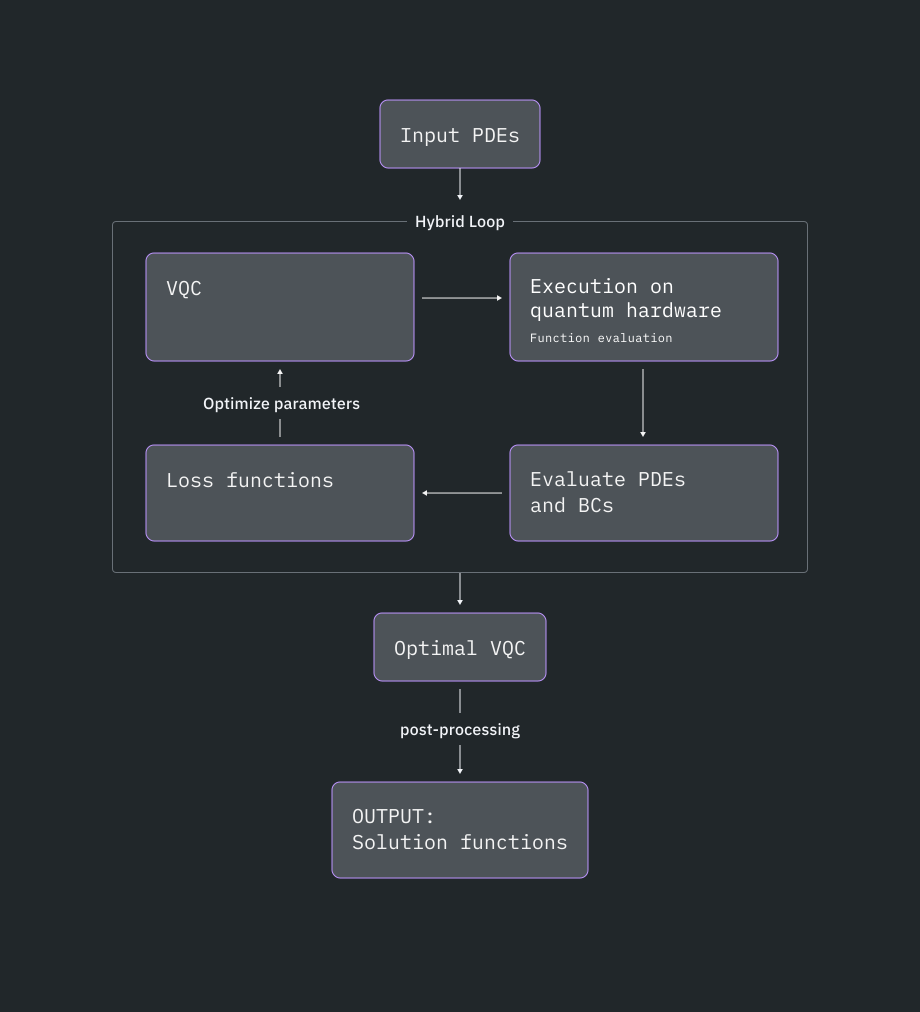
In addition to this hybrid loop, you can also chain together different optimizers. This is useful when you want a global optimizer to find a good set of angles, and then a more fine-tuned optimizer to follow a gradient to the best set of neighboring angles. In the case of computational fluid dynamics (CFD), the default optimization sequence produces the best results - but in the case of material deformation (MD), while the default provides good results, you can configure it further for problem-specific benefits.
Note for each variable of the function, we specify number of qubits (which you can play with). By stacking 10 identical circuits and evaluating the 10 identical observables on different qubits throughout one big circuit, you can noise-mitigate within the CMA optimization process, relying on the noise learner method, and significantly reduce the number of shots needed.
Computational fluid dynamics
The inviscid Burgers' equation models flowing non-viscous fluids as follows:
represents the fluid speed field. This use-case has a temporal boundary condition: you can select the initial condition and then allow the system to relax. Currently, the only accepted initial conditions are linear functions: . The analytical solution is:
The pressureless Euler equations model compressible inviscid fluid flow with damping as follows:
represents the density field, the velocity field and a damping coefficient. In our formulation, we pose , so it will not be used as a parameter in the following. This use-case has temporal boundary conditions: and . The analytical solution is:
The arguments for CFD's differential equations are on a fixed grid, as follows:
- is between 0 and 0.95 with 41 sample points. is between 0 and 0.95 with 41 sample points.
Material deformation
This use case focuses on hypoelastic deformation with the one-dimensional tensile test, in which a bar fixed in space is pulled at its other extremity. We describe the problem as follows:
represents the bulk modulus of the material being stretched, the exponent of a power law, the force per unit mass, the proportional stress limit, the proportional strain limit, the stress function, and the strain function. The analytical solution is:
where is the boundary condition on the strain at .
The considered bar is of unitary length. This use-case has a boundary condition for surface stress , or the amount of work needed to stretch the bar.
The arguments for MD's differential equations are on a fixed grid, as follows:
- is between 0 and 1 with 30 sample points.
Benchmarks
The following table presents statistics on various runs of our function.
Example | Number of qubits | Initialization | Error | Total time (min) | Runtime usage (min) |
|---|---|---|---|---|---|
| Inviscid Burgers' equation | 50 | PHYSICALLY_INFORMED | 66 | 25 | |
| Pressureless Euler's equations | 70 | PHYSICALLY_INFORMED | 48 | 34 | |
| Hypoelastic 1D tensile test | 18 | RANDOM | 123 | 100 |
Get started
Fill out the form to request access to the QUICK-PDE function. Then, assuming you've already saved your account to your local environment, select the function as follows:
from qiskit_ibm_catalog import QiskitFunctionsCatalog

catalog = QiskitFunctionsCatalog(
    channel="ibm_cloud / ibm_quantum_platform",
    instance="USER_CRN / HGP",
    token="USER_API_KEY / IQP_API_TOKEN",
)

catalog = QiskitFunctionsCatalog(channel="ibm_quantum_platform")

# Verify that you have access to the function
catalog.list()
quick = catalog.load("colibritd/quick-pde")Examples
To get started, try one of the following examples:
Inviscid Burgers' equation (CFD)
For Burgers' equation, when initial conditions are set to , the results are as follows:
# launch the simulation with initial conditions u(0,x) = a*x + b
job = quick.run(
    use_case="CFD_BURGER", physical_parameters={"a": 1.0, "b": 0.0}
)
Check your Qiskit Function workload's status or return results as follows:
# Print the ID so you can use it later, if necessary
print(job.job_id)
print(job.status())
solution = job.result()
import numpy as np
import matplotlib.pyplot as plt
def plot_result_3d(result):
fig = plt.figure()
ax = fig.add_subplot(projection="3d")
t, x = np.meshgrid(result["samples"]["t"], result["samples"]["x"])
ax.plot_surface(
t,
x,
result["functions"]["u"],
edgecolor="royalblue",
lw=0.25,
rstride=26,
cstride=26,
alpha=0.3,
)
ax.scatter(t, x, result["functions"]["u"], marker=".")
ax.set(xlabel="t", ylabel="x", zlabel="u(t,x)")
plt.show()
# Call
plot_result_3d(solution)Pressureless Euler's equation (CFD)
For Euler's equation, when initial conditions are set to and , for a given (here, ) and , the results are as follows:
# Launches the solving for an arbitrary mu
job = quick.run(use_case="CFD_EULER", physical_parameters={"mu": 0.1})

solution = job.result()


# Colorplot function
def plot_result_2d(result):
    fig, axes = plt.subplots(1, 2, figsize=(14, 5))

    configs = {
        "g": {"cmap": "viridis", "title": "g(t, x)"},
        "u": {"cmap": "plasma", "title": "u(t, x)"},
    }

    t = result["samples"]["t"]
    x = result["samples"]["x"]

    for ax, (field, cfg) in zip(axes, configs.items()):
        v = result["functions"][field]

        im = ax.contourf(t, x, v, levels=50, cmap=cfg["cmap"])
        fig.colorbar(im, ax=ax, label=cfg["title"])

        ax.set_xlabel("t")
        ax.set_ylabel("x")
        ax.set_title(cfg["title"], fontsize=13, fontweight="bold")

    plt.tight_layout()
    plt.show()


plot_result_2d(solution)
Material deformation
The material deformation use case requires the physical parameters of your material and the applied force, as follows:
# Select the properties of your material
job = quick.run(
    use_case="MD",
    physical_parameters={
        "t": 12.0,
        "K": 100.0,
        "n": 4.0,
        "b": 10.0,
        "epsilon_0": 0.1,
        "sigma_0": 5.0,
    },
)

# Plot the result
solution = job.result()

_ = plt.figure()
stress_plot = plt.subplot(211)
plt.plot(solution["samples"]["x"], solution["functions"]["u"])
strain_plot = plt.subplot(212)
plt.plot(solution["samples"]["x"], solution["functions"]["sigma"])

plt.show()
The following is an example of how to get the value of the function for a specific set of coordinates:
# u(t=0.2, x=0.7) == 2
assert solution["samples"]["t"][1] == 0.2
assert solution["samples"]["x"][2] == 0.7
assert solution["functions"]["u"][1, 2] == 2
Fetch error messages
If your workload status is ERROR, use job.error_message() to fetch the error message to help debug, as follows:
job = quick.run(use_case="MD", physical_params={})

print(job.error_message())


# A wrapper can also be used for a more human readable version
def pprint_error(job):
    print("".join(eval(job.error_message())["error"]))


print("___")
pprint_error(job)
Get support
For support, contact qiskit-function-support@colibritd.com.
Next steps
- Fill out the form to request access to the QUICK-PDE function.
- Visit the API reference for this Qiskit Function.
- Try modeling a flowing non-viscous fluid using QUICK-PDE in the tutorial.
- Review Jaffali, H., et al. (2025). H-DES: a Quantum-Classical Hybrid Differential Equation Solver. arXiv preprint arXiv:2410.01130.