Classical feedforward and control flow (dynamic circuits)
The code on this page was developed using the following requirements. We recommend using these versions or newer.
qiskit[all]~=2.5.2
Dynamic circuits are powerful tools with which you can measure qubits in the middle of a quantum circuit execution and then perform classical logic operations within the circuit, based on the outcome of those mid-circuit measurements. This process is also known as classical feedforward. While these are early days of understanding how best to take advantage of dynamic circuits, the quantum research community has already identified a number of use cases, such as the following:
- Efficient quantum state preparation, such as GHZ state, W-state (for more information about W-state, also refer to "State preparation by shallow circuits using feed forward"), and a broad class of matrix product states
- Efficient long-range entanglement between qubits on the same chip by using shallow circuits
- Efficient sampling of IQP-like circuits
Qiskit supports four control flow constructs for classical feedforward, each implemented as a method on QuantumCircuit. The constructs and their corresponding methods are:
- If statement -
QuantumCircuit.if_test - Switch statement -
QuantumCircuit.switch - For loop -
QuantumCircuit.for_loop - While loop -
QuantumCircuit.while_loop
Each of these methods returns a context manager and is typically used in a with statement. The remainder of this guide explains each of these constructs and how to use them.
There are some limitations of classical feedforward and control flow operations on quantum hardware that might impact your program. For more information, see Execute dynamic circuits.
if statement
The if statement is used to conditionally perform operations based on the value of a classical bit or register.
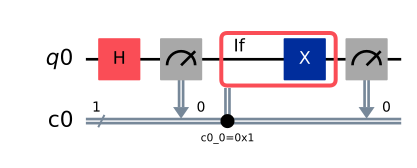
In the example below, we apply a Hadamard gate to a qubit and measure it. If the result is 1, then we apply an X gate on the qubit, which has the effect of flipping it back to the 0 state. We then measure the qubit again. The resulting measurement outcome should be 0 with 100% probability.
from qiskit.circuit import QuantumCircuit, QuantumRegister, ClassicalRegister

qubits = QuantumRegister(1)
clbits = ClassicalRegister(1)
circuit = QuantumCircuit(qubits, clbits)
(q0,) = qubits
(c0,) = clbits

circuit.h(q0)
circuit.measure(q0, c0)
with circuit.if_test((c0, 1)):
    circuit.x(q0)
circuit.measure(q0, c0)
circuit.draw("mpl")

# example output counts: {'0': 1024}
Output:
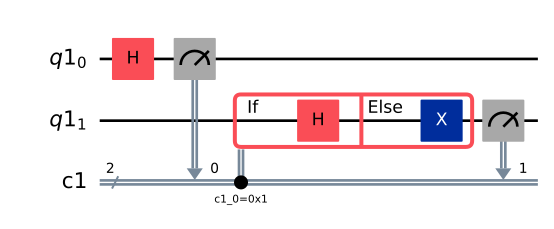
The with statement can be given an assignment target which is itself a context manager that can be stored and subsequently used to create an else block, which is executed whenever the contents of the if block are not executed.
In the example below, we initialize registers with two qubits and two classical bits. We apply a Hadamard gate to the first qubit and measure it. If the result is 1, then we apply a Hadamard gate on the second qubit; otherwise, we apply an X gate on the second qubit. Finally, we measure the second qubit as well.
qubits = QuantumRegister(2)
clbits = ClassicalRegister(2)
circuit = QuantumCircuit(qubits, clbits)
(q0, q1) = qubits
(c0, c1) = clbits

circuit.h(q0)
circuit.measure(q0, c0)
with circuit.if_test((c0, 1)) as else_:
    circuit.h(q1)
with else_:
    circuit.x(q1)
circuit.measure(q1, c1)

circuit.draw("mpl")

# example output counts: {'01': 260, '11': 272, '10': 492}
Output:
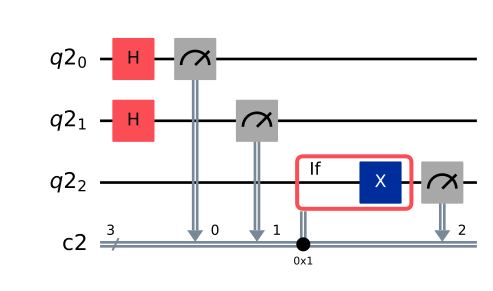
In addition to conditioning on a single classical bit, it's also possible to condition on the value of a classical register composed of multiple bits.
In the example below, we apply Hadamard gates to two qubits and measure them. If the result is 01, that is, the first qubit is 1 and the second qubit is 0, then we apply an X gate to a third qubit. Finally, we measure the third qubit. Note that for clarity, we chose to specify the state of the third classical bit, which is 0, in the if condition. In the circuit drawing, the condition is indicated by the circles on the classical bits being conditioned on. A solid circle indicates conditioning on 1, while an outlined circle indicates conditioning on 0.
qubits = QuantumRegister(3)
clbits = ClassicalRegister(3)
circuit = QuantumCircuit(qubits, clbits)
(q0, q1, q2) = qubits
(c0, c1, c2) = clbits

circuit.h([q0, q1])
circuit.measure(q0, c0)
circuit.measure(q1, c1)
with circuit.if_test((clbits, 0b001)):
    circuit.x(q2)
circuit.measure(q2, c2)

circuit.draw("mpl")

# example output counts: {'101': 269, '011': 260, '000': 252, '010': 243}
Output:
Switch statement
The switch statement is used to select actions based on the value of a classical bit or register. It is similar to an if statement, but you can specify more cases for the branching logic. The example below applies a Hadamard gate to a qubit and measures it. If the result is 0, apply an X gate on the qubit, and if the result is 1, apply a Z gate. The resulting measurement outcome should be 1 with 100% probability.
qubits = QuantumRegister(1)
clbits = ClassicalRegister(1)
circuit = QuantumCircuit(qubits, clbits)
(q0,) = qubits
(c0,) = clbits

circuit.h(q0)
circuit.measure(q0, c0)
with circuit.switch(c0) as case:
    with case(0):
        circuit.x(q0)
    with case(1):
        circuit.z(q0)
circuit.measure(q0, c0)

circuit.draw("mpl")

# example output counts: {'1': 1024}
Output:
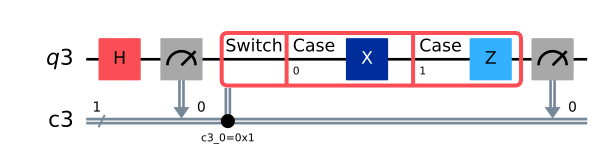
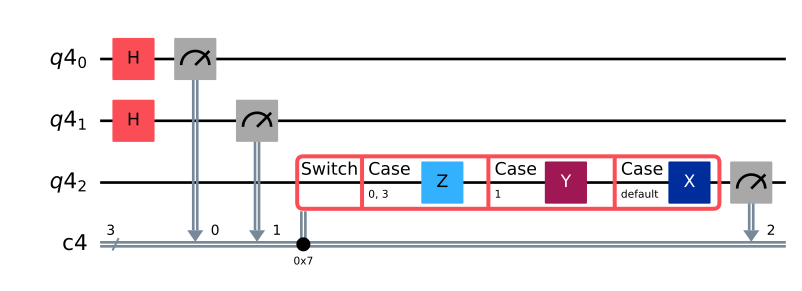
Because the example above used a single classical bit, there were only two possible cases, so you could have achieved the same result using an if-else statement. The switch case is mainly useful when branching on the value of a classical register composed of multiple bits. The following example shows how to construct a default case, which is executed if none of the preceding cases are. Note that in a switch statement, only one of the blocks are ever executed. There is no fallthrough.
The example below applies Hadamard gates to two qubits and measures them. If the result is either 00 or 11, apply a Z gate to the third qubit. If the result is 01, apply a Y gate. If none of the preceding cases matched, apply an X gate. Finally, measure the third qubit.
qubits = QuantumRegister(3)
clbits = ClassicalRegister(3)
circuit = QuantumCircuit(qubits, clbits)
(q0, q1, q2) = qubits
(c0, c1, c2) = clbits

circuit.h([q0, q1])
circuit.measure(q0, c0)
circuit.measure(q1, c1)
with circuit.switch(clbits) as case:
    with case(0b000, 0b011):
        circuit.z(q2)
    with case(0b001):
        circuit.y(q2)
    with case(case.DEFAULT):
        circuit.x(q2)
circuit.measure(q2, c2)

circuit.draw("mpl")

# example output counts: {'101': 267, '110': 249, '011': 265, '000': 243}
Output:
For loop
A for loop is used to iterate over a sequence of classical values and perform some operations during each iteration.
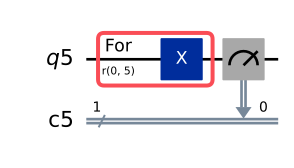
The following example uses a for loop to apply 5 X gates to a qubit and then measures it. Because it performs an odd number of X gates, the overall effect is to flip the qubit from the 0 state to the 1 state.
qubits = QuantumRegister(1)
clbits = ClassicalRegister(1)
circuit = QuantumCircuit(qubits, clbits)
(q0,) = qubits
(c0,) = clbits

with circuit.for_loop(range(5)) as _:
    circuit.x(q0)
circuit.measure(q0, c0)

circuit.draw("mpl")

# example output counts: {'1': 1024}
Output:
While loop
A while loop is used to repeat instructions while some condition is satisfied.
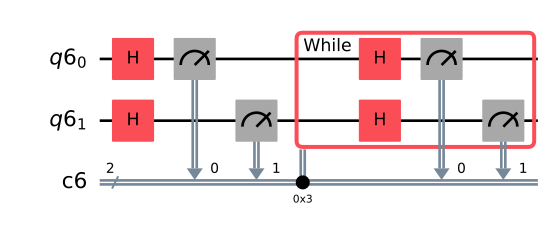
The example below applies Hadamard gates to two qubits and measures them. Then it creates a while loop that repeats this procedure while the measurement outcome is 11. As a result, the final measurement should never be 11, with the remaining possibilities appearing with approximately equal frequency.
qubits = QuantumRegister(2)
clbits = ClassicalRegister(2)
circuit = QuantumCircuit(qubits, clbits)

q0, q1 = qubits
c0, c1 = clbits

circuit.h([q0, q1])
circuit.measure(q0, c0)
circuit.measure(q1, c1)
with circuit.while_loop((clbits, 0b11)):
    circuit.h([q0, q1])
    circuit.measure(q0, c0)
    circuit.measure(q1, c1)

circuit.draw("mpl")

# example output counts: {'01': 334, '10': 368, '00': 322}
Output:
Classical expressions
The Qiskit classical expression module qiskit.circuit.classical contains an exploratory representation of runtime operations on classical values during circuit execution.
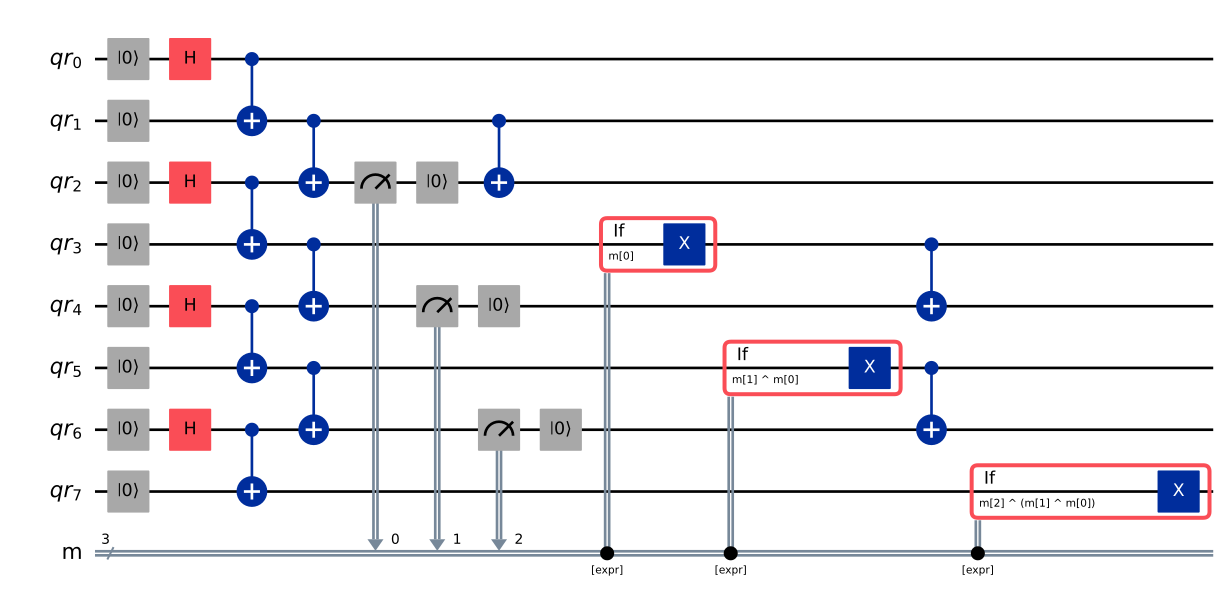
The following example shows that you can use the calculation of the parity to create an n-qubit GHZ state using dynamic circuits. First, generate Bell pairs on adjacent qubits. Then, glue these pairs together using a layer of CNOT gates in between pairs. You then measure the target qubit of all prior CNOT gates and reset each measured qubit to the state . You apply to every unmeasured site for which the parity of all preceding bits is odd. Finally, CNOT gates are applied to the measured qubits to re-establish the entanglement lost in the measurement.
In the parity calculation, the first element of the constructed expression involves lifting the Python object mr[0] to a Value node (lift is used to turn arbitrary objects into classical expressions). This is not necessary for mr[1] and the possible following classical register, as they are inputs to expr.bit_xor, and any necessary lifting is done automatically in these cases. Such expressions can be built up in loops and other constructs.
from qiskit import QuantumCircuit, QuantumRegister, ClassicalRegister
from qiskit.circuit.classical import expr

num_qubits = 8
if num_qubits % 2 or num_qubits < 4:
    raise ValueError("num_qubits must be an even integer ≥ 4")
meas_qubits = list(range(2, num_qubits, 2))  # qubits to measure and reset

qr = QuantumRegister(num_qubits, "qr")
mr = ClassicalRegister(len(meas_qubits), "m")
qc = QuantumCircuit(qr, mr)

# Create local Bell pairs
qc.reset(qr)
qc.h(qr[::2])
for ctrl in range(0, num_qubits, 2):
    qc.cx(qr[ctrl], qr[ctrl + 1])

# Glue neighboring pairs
for ctrl in range(1, num_qubits - 1, 2):
    qc.cx(qr[ctrl], qr[ctrl + 1])

# Measure boundary qubits between pairs,reset to 0
for k, q in enumerate(meas_qubits):
    qc.measure(qr[q], mr[k])
    qc.reset(qr[q])

# Parity-conditioned X corrections
# Each non-measured qubit gets flipped iff the parity (XOR) of all
# preceding measurement bits is 1
for tgt in range(num_qubits):
    if tgt in meas_qubits:  # skip measured qubits
        continue
    # all measurement registers whose physical qubit index < tgt
    left_bits = [k for k, q in enumerate(meas_qubits) if q < tgt]
    if not left_bits:  # skip if list empty
        continue

    # build XOR-parity expression
    parity = expr.lift(
        mr[left_bits[0]]
    )  # lift the first bit to Value so it will be treated like a boolean.
    for k in left_bits[1:]:
        parity = expr.bit_xor(
            mr[k], parity
        )  # calculate parity with all other bits
    with qc.if_test(parity):  # Add X if parity is 1
        qc.x(qr[tgt])

# Re-entangle measured qubits
for ctrl in range(1, num_qubits - 1, 2):
qc.cx(qr[ctrl], qr[ctrl + 1])qc.draw(output="mpl", style="iqp", idle_wires=False, fold=-1)Output:
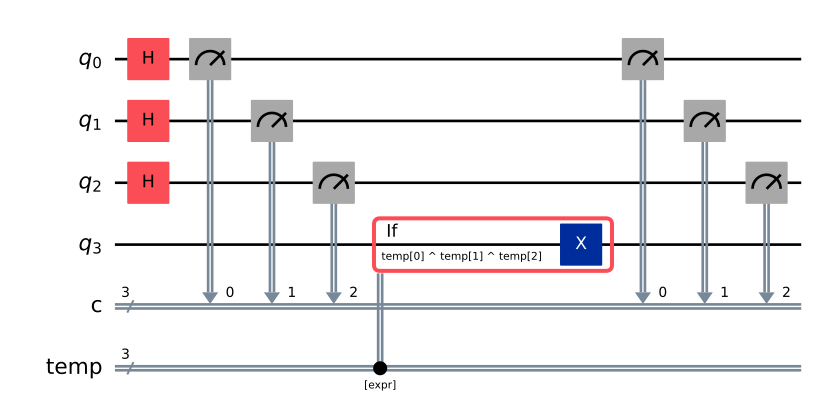
Store
You can use the store instruction to save the result of a classical expression, if that expression will be used repeatedly. Operations are automatically parallelized, making your code significantly more efficient at runtime.
For example, it is more natural and more efficient at runtime to write , where , than . The former computes the negation in a single parallel step before the XOR chain, instead of evaluating each negation sequentially inside the expression.
Full example:
from qiskit.circuit import QuantumCircuit, QuantumRegister, ClassicalRegister
from qiskit.circuit.classical import expr

qregs = QuantumRegister(4, "q")
creg = ClassicalRegister(3, "c")
# temp is a plain ClassicalRegister used as the store target
temp = ClassicalRegister(3, "temp")
qc = QuantumCircuit(qregs, creg, temp)

qc.h([0, 1, 2])
qc.measure([0, 1, 2], creg)

# Store bit-NOT of the full 3-bit register into temp
qc.store(temp, expr.bit_not(creg))

# Compute parity of temp using bit-indexed XOR
parity = expr.bit_xor(
    expr.bit_xor(expr.index(temp, 0), expr.index(temp, 1)),
    expr.index(temp, 2),
)

# Flip q3 if parity of ~creg is 1
with qc.if_test(parity):
    qc.x(3)

qc.measure([0, 1, 2], creg)

qc.draw("mpl")
Output:
Next steps
- Learn how to implement accurate dynamic decoupling by using stretch.
- Use circuit schedule visualization to debug and optimize your dynamic circuits.
- Execute dynamic circuits.